
前言
推荐课程:MIT 6.092
常识
Java 是 Sun 公司开发的一套高级编程语言,所以有一些原生 jdk 包会以 sun 开头,后面被 Oracle 收购
Java 开发方向分为三种:
- Java SE(Java Platform Standard Edition):包含构成 Java 语言核心的类,如数据库连接、接口定义、输入/输出、网络编程
- Java EE(Java Platform Enterprise Edition):Java SE + 开发企业级应用的类,如 EJB、Servlet、JSP、XML、事务控制
- Java ME(Java Platform Micro Edition):被 Android 开发取代了
高级语言具有可移植性,对于 Java 而言就是可以仅提供一个 class 从而在各个安装了对应版本 java 的计算机平台上运行,这是通过 Java 自身的 JVM 虚拟机实现的
对于高级语言编写的程序有两种方式进行翻译:
- 解释:完成解释任务的程序叫做解释器,解释器对程序进行翻译,然后执行命令
- 编译:编译是一个单独的步骤,运行则在编译后,此时高级语言就是源代码,编译后可执行程序
Java 编写的程序既可以被编译,也可以被解释。但是 Java 的编译过程并不生成机器语言,而是生成字节码(byte code)
命令行操作
一些常用的命令行 java 命令
# 编译
javac file.java
javac -encoding UTF-8 file.java
javac -d ./out file.java

# 运行普通class
java filename

# 运行带包名class
java com.example.filename

# 指定依赖库运行,前者是unix,后者是windows
java -cp ".:lib/*" filename
java -cp ".;lib*" HelloWorld

# 运行jar包
java -jar app.jar
java -Xms512m -Xmx1024m -jar app.jar

# 传递环境变量运行jar包
java -Dfile.encoding=UTF-8 -Dspring.profiles.active=prod -jar app.jar
jar 常用命令
# 打包
jar cvf app.jar *.class

# 指定 entrypoint 程序入口
jar cvfe app.jar HelloWorld *.class

# 列出jar包目录
jar tvf app.jar

# 解压jar包
jar xvf app.jar
jar xvf app.jar BOOT-INF/classes/application.yml

# 替换jar包中某个文件
jar uvf app.jar BOOT-INF/classes/application.yml
Hello World
编写一个 1.java
class Hello{
	public static void main(String[] arguments){
	System.out.println("Hello World!");
	}
}
然后命令行执行 javac 1.java 进行编译,可以发现生成了一个 Hello.class
这就是编译出来的 Hello 类,输入 java Hello 即可执行
基础类型&运算符
boolean
int
double
String
运算符:=、+、-、*、/、(、)、%
不同类型之间的 + 运算:任何类型的数据都向 String 转型
String text = "hello" + " world";
text = text + " number " + 5;
// text = "hello world number 5"
注意 / 在 int 和 double 下会产生不同的运算结果:
double a = 5.0/2.0; // a = 2.5
int b = 4/2; // b = 2
int c = 5/2; // c = 2
double d = 5/2; // d = 2.0
类型转换:
int a = 2; // a = 2
double a = 2; // a = 2.0 (Implicit)

int a = 18.7; // ERROR
int a = (int)18.7; // a = 18

double a = 2/3; // a = 0.0
double a = (double)2/3; // a = 0.6666…
Math 类
使用 Math 类下的方法进行数学计算
Math.sin(x)
Math.cos(Math.PI / 2)
Math.pow(2, 3)
Math.log(Math.log(x + y))
方法
public static void NAME(TYPE NAME) {
	STATEMENTS
}

NAME(EXPRESSION);
static
- 使用
static声明属性,则此属性为全局属性 - 使用
static声明方法,则此属性可被称为“类方法”,可以由类名称直接调用
形参和实参
public static void printTwice(String s) {	// 此处的 s 是该方法的形参
	System.out.println(s);
	System.out.println(s);
}

printTwice("Never gonna give you up.");	// 此处调用方法传入实参
栈帧图
方法的形参和变量只在该方法内部有效
为了跟踪变量属于哪个方法,可以画栈帧图,以上面的示例为例子,栈图如下:
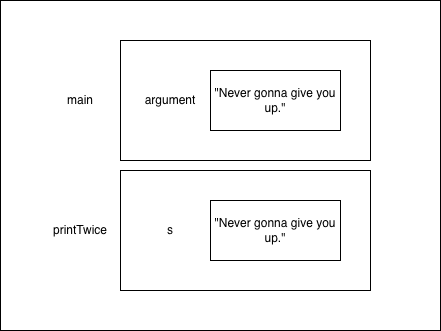
对于每一个方法,都有其对应的方框来包含该方法中的形参和变量,这样的方框叫做帧
条件语句
x > y: x is greater than y
x < y: x is less than y
x >= y: x is greater than or equal to x
x <= y: x is less than or equal to y
x == y: x equals y
返回语句
允许我们在一个方法执行完之前就使用 return 结束该方法的执行,比如在错误的时候使用返回语句:
public static void printLogarithm(double x) {
	if (x <= 0.0) {
		System.out.println("numbers should be greater than 0");
		return;
	}
	double result = Math.log(x);
	System.out.println(result);
}
如果 x <= 0 则会打印出错信息并使用返回语句结束该方法的执行,即使方法中还有没执行的代码
递归
public static void countdown(int n) {
	if (n == 0) {
		System.out.println("Blastoff!");
	} else {
		System.out.println(n);
		countdown(n-1);
	}
}
countdown(3);
ASSN 1 - GravityCalculator
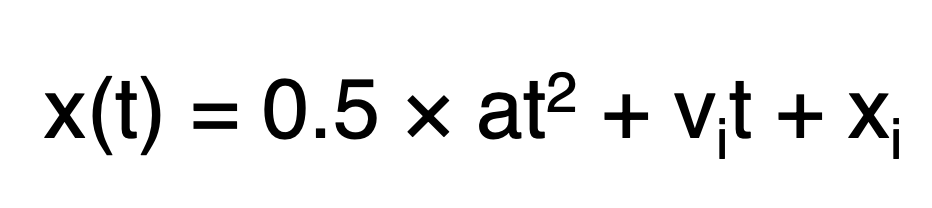
Compute the position of a falling object:
class GravityCalculator {
    public static void main(String[] arguments) {
        double gravity = -9.81;  // Earth's gravity in m/s^2
        double initialVelocity = 0.0;
        double fallingTime = 10.0;
        double initialPosition = 0.0;
        double finalPosition = 0.0;
        finalPosition = 0.5 * gravity * fallingTime * fallingTime + initialVelocity * fallingTime + initialPosition
        System.out.println("The object's position after " + fallingTime +
                " seconds is " + finalPosition + " m.");
    }
}
ASSN 2 - FooCorporation
对于前 40 小时内的工作,员工按“工作时长 × 基本工资”获得报酬。
对于超过 40 小时的部分,每小时的加班费为“基本工资 × 1.5”。
基本工资不得低于最低工资标准(每小时 8.00 美元);若低于此标准,程序需输出错误提示。
若工作时长超过 60 小时,程序需输出错误信息。
请编写一个方法,接收基本工资和工作时长作为参数,并输出总薪资或错误信息。同时编写一个主方法(main method),针对以下每位员工调用该方法:
| Base Pay | Hours Worked | |
|---|---|---|
| Employee 1 | $7.50 | 35 |
| Employee 2 | $8.20 | 47 |
| Employee 3 | $10.00 | 73 |
class FooCorporation{
    public static void main(String[] args) {
        double Employee1Pay = calculatePay(35, 7.5);
        double Employee2Pay = calculatePay(47, 8.2);
        double Employee3Pay = calculatePay(73, 10.0);
        System.out.println("Employee 1 Pay: $" + Employee1Pay);
        System.out.println("Employee 2 Pay: $" + Employee2Pay);
        System.out.println("Employee 3 Pay: $" + Employee3Pay);
    }

    public static double calculatePay(double hoursWorked, double basePay) {
        if (basePay < 8.0) {
            return -1;
        }
        if (hoursWorked > 60) {
            return -1;
        }
        double regularHours = Math.min(hoursWorked, 40);
        double overtimeHours = Math.max(hoursWorked - 40, 0);
        double regularPay = regularHours * basePay;
        double overtimePay = overtimeHours * basePay * 1.5;
        return regularPay + overtimePay;
    }
}
良好的代码风格
- 使用有意义的名称
- 使用缩进
- 使用空格
- 不要重复条件测试
if (basePay < 8.0) {
	...
} else if (hours > 60) {
	...
} else if (basePay >= 8.0 && hours <= 60){
	...
}
// 第三个判断应直接使用 else
循环
while 和 for 循环
while (condition){
	statements
}

for (initialization;condition;update){
	statements
}
注意:如果 for 循环后面没有使用 {},那么循环体只会包含紧跟在它后面的第一条语句
for (int i=0;i<5;i++)
    System.out.println("Hi");
System.out.println("Bye");


// 输出结果如下
/*
Hi
Hi
Hi
Hi
Hi
Bye
*/
ASSN 3 - Marathon
编写一个方法,接收一个整数数组作为输入,并返回用时最短的人员对应的索引。对该用时数组调用此方法,并打印出与返回索引对应的人员姓名及用时。编写第二个方法来找出成绩第二好的跑步者;该方法应先调用第一个方法确定成绩最好的跑步者,然后遍历所有数值,找出第二好(即第二短)的用时。
class Marathon {
    public static void main (String[] arguments) {
        String[] names = {
            "Elena", "Thomas", "Hamilton", "Suzie", "Phil", "Matt", "Alex",
            "Emma", "John", "James", "Jane", "Emily", "Daniel", "Neda",
            "Aaron", "Kate"
        };

        int[] times = {
            341, 273, 278, 329, 445, 402, 388, 275, 243, 334, 412, 393, 299,
            343, 317, 265
        };

        for (int i = 0; i < names.length; i++) {
            System.out.println(names[i] + ": " + times[i]);
        }

        System.out.println("The fastest runner is " + names[getFastestRunnerIndex(times)] + " with a time of " + times[getFastestRunnerIndex(times)] + " minutes.");
        System.out.println("The second fastest runner is " + names[getSecondFastestRunnerIndex(times)] + " with a time of " + times[getSecondFastestRunnerIndex(times)] + " minutes.");

    }

    public static int getFastestRunnerIndex(int[] times) {
        int fastestIndex = 0;
        for (int i = 1; i < times.length; i++) {
            if (times[i] < times[fastestIndex]) {
                fastestIndex = i;
            }
        }
        return fastestIndex;
    }

    public static int getSecondFastestRunnerIndex(int[] times) {
        int fastestIndex = getFastestRunnerIndex(times);
        int secondFastestIndex = -1;
        for (int i = 0; i < times.length; i++) {
            if (i != fastestIndex) {
                if (secondFastestIndex == -1 || times[i] < times[secondFastestIndex]) {
                    secondFastestIndex = i;
                }
            }
        }
        return secondFastestIndex;
    }
}
此处对于第二名的查找,是在判断排除了第一名的情况下遍历整个数组实现的
类
在定义一个类时,也创建了一个同名的对象类型
当使用 new 来创建对象时,Java 将调用一个特殊的方法——构造函数(constructor)来初始化该对象的实例变量
对象方法在类定义中进行定义
类定义的语法:
- 类名应该首字母大写以区别于原始类型和变量名
- 通常,在一个文件中只定义一个类,文件名应该和类名一样
- 任何应用程序都应该提供一个启动类(startup class),启动类中应该包含一个名为 main 的方法,该方法即为程序的执行入口。其它类也可以包含 main 方法,但是这个 main 方法不会被执行。
接下来以 Time 类作为示例,首先在类定义的开始处定义实例变量:
class Time {
	int hour, minute;
	double second;
}
构造函数
- 构造函数的名字与类名相同
- 构造函数没有返回类型和返回值,编译器通过有无返回类型的声明来识别构造函数
- 关键字 static 被省略
public Time() {
	this.hour = 0;
	this.minute = 0;
	this.secont = 0.0;
}

public Time(int hour, int minute, double second) {
	this.hour = hour;
	this.minute = minute;
	this.secont = second;
}
ASSN 4 - Library
我们提供了 Book 和 Library 两个类,用于实现图书数据库的功能。你需要实现其中缺失的方法,以使这些类能够正常工作。
Book 类实现
首先,我们需要一个类来对书籍进行建模。请先创建一个名为 Book 的类,并复制粘贴下方的代码框架。该类定义了获取书名、查询书籍是否可借、借书以及还书的方法。不过,我们提供的框架中缺少这些方法的具体实现。请在方法体中填入相应的代码。main 方法用于测试这些方法。运行程序时,输出结果应如下所示:
Title (should be The Da Vinci Code): The Da Vinci Code
Rented? (should be false): false
Rented? (should be true): true
Rented? (should be false): false
public class Book {
String title;
boolean borrowed;
// Creates a new Book
public Book(String bookTitle) {
// Implement this method
this.title = bookTitle;
this.borrowed = false;
}
// Marks the book as rented
public void rented() {
// Implement this method
this.borrowed = true;
}
// Marks the book as not rented
public void returned() {
// Implement this method
this.borrowed = false;
}
// Returns true if the book is rented, false otherwise
public boolean isBorrowed() {
// Implement this method
return this.borrowed;
}
// Returns the title of the book
public String getTitle() {
// Implement this method
return this.title;
}
public static void main(String[] arguments) {
// Small test of the Book class
Book example = new Book("The Da Vinci Code");
System.out.println("Title (should be The Da Vinci Code): " + example.getTitle());
System.out.println("Borrowed? (should be false): " + example.isBorrowed());
example.rented();
System.out.println("Borrowed? (should be true): " + example.isBorrowed());
example.returned();
System.out.println("Borrowed? (should be false): " + example.isBorrowed());
}
}Library 类实现
接下来,我们需要创建一个类来表示各个图书馆,并管理其中的藏书。所有图书馆的开放时间相同:每天上午 9 点至下午 5 点。不过,它们的地址和藏书(即 Book 对象的数组)各不相同。
请创建一个名为 Library 的类,并复制粘贴下方的代码框架。我们提供了一个 main 方法,用于创建两个图书馆并对其中的书籍执行一些操作;但目前该类缺少所有必要的方法和成员变量。你需要定义并实现这些缺失的方法。请阅读 main 方法并查看编译错误,以确定具体缺少哪些方法。
有些方法需要定义为静态方法,而另一些则需要定义为实例方法。
比较 String 对象时请务必小心。应使用 string1.equals(string2) 来比较 string1 和 string2 的内容。
建议采取分步实现的方式。首先注释掉整个 main 方法,然后逐行取消注释。运行程序,确保前几行代码能正常工作,接着取消下一行的注释并调试通过,依此类推。
import java.util.ArrayList;

public class Library {
    // Add the missing implementation to this class
    public String address;
    public ArrayList<Book> books;

    public Library(String address) {
        this.address = address;
        this.books = new ArrayList<Book>();
    }

    public void addBook(Book book) {
        this.books.add(book);
    }

    public static void printOpeningHours() {
        System.out.println("9 AM to 5 PM");
    }

    public void printAddress() {
        System.out.println(this.address);
    }

    public void borrowBook(String title){
        for (Book book : books) { // Java语法糖,等价于 for (int i = 0; i < books.size(); i++) { Book book = books.get(i); ... }
            if (book.getTitle().equals(title)) {
                if (!book.isBorrowed()) {
                    book.rented();
                    System.out.println("You successfully borrowed " + title);
                    return;
                } else {
                    System.out.println("Sorry, this book is already borrowed.");
                    return;
                }
            }
        }
        System.out.println("Sorry, this book is not in our catalog.");
    }

    public void printAvailableBooks() {
        boolean hasAvailableBooks = false;
        for (Book book : books) {
            if (!book.isBorrowed()) {
                System.out.println(book.getTitle());
                hasAvailableBooks = true;
            }
        }
        if (!hasAvailableBooks) {
            System.out.println("No book in catalog");
        }
    }

    public void returnBook(String title) {
        for (Book book : books) {
            if (book.getTitle().equals(title)) {
                if (book.isBorrowed()) {
                    book.returned();
                    System.out.println("You successfully returned " + title);
                    return;
                } else {
                    System.out.println("This book was not borrowed.");
                    return;
                }
            }
        }
        System.out.println("Sorry, this book is not in our catalog.");
    }

    public static void main(String[] args) {
        // Create two libraries
        Library firstLibrary = new Library("10 Main St.");
        Library secondLibrary = new Library("228 Liberty St.");

        // Add four books to the first library
        firstLibrary.addBook(new Book("The Da Vinci Code"));
        firstLibrary.addBook(new Book("Le Petit Prince"));
        firstLibrary.addBook(new Book("A Tale of Two Cities"));
        firstLibrary.addBook(new Book("The Lord of the Rings"));

        // Print opening hours and the addresses
        System.out.println("Library hours:");
        printOpeningHours();
        System.out.println();

        System.out.println("Library addresses:");
        firstLibrary.printAddress();
        secondLibrary.printAddress();
        System.out.println();

        // Try to borrow The Lords of the Rings from both libraries
        System.out.println("Borrowing The Lord of the Rings:");
        firstLibrary.borrowBook("The Lord of the Rings");
        firstLibrary.borrowBook("The Lord of the Rings");
        secondLibrary.borrowBook("The Lord of the Rings");
        System.out.println();

        // Print the titles of all available books from both libraries
        System.out.println("Books available in the first library:");
        firstLibrary.printAvailableBooks();
        System.out.println();
        System.out.println("Books available in the second library:");
        secondLibrary.printAvailableBooks();
        System.out.println();

        // Return The Lords of the Rings to the first library
        System.out.println("Returning The Lord of the Rings:");
        firstLibrary.returnBook("The Lord of the Rings");
        System.out.println();

        // Print the titles of available from the first library
        System.out.println("Books available in the first library:");
        firstLibrary.printAvailableBooks();
    }
}
包与访问控制
基本概念
应对协作开发中出现类名称相同的情况
package 包名称.子包名称此后编译需要使用 -d 参数指定生成目录
javac -d ./out file.java然后执行该类时需要输入完整的包.类名称
java com.example.hello如果几个类存放在不同的包中,则在使用类的时候需要通过 import 导入
import 包名称.子包名称.类名称	// 手工导入类
import 包名称.子包名称.*	// JVM自动加载所需要的类
注意,一个类如果要被外部包访问,则此类一定要定义成 public class
静态导入:JDK 1.5 之后,如果一个类中的方法全是使用 static 声明的静态方法,则在导入的时候可以直接使用 import static 的方式导入,然后就可以直接输入方法名调用了静态方法
系统常见包
| 包名称 | 作用 |
|---|---|
| java.lang | 基本包,String 类就保存在此包中,JDK 1.0 后自动导入 |
| java.lang.reflect | 反射机制包,是 java.lang 的子包 |
| java.util | 工具包,一些常用的类库、日期操作等都在此包 |
| java.text | 文本处理类库 |
| java.sql | 数据库操作包 |
| java.net | 网络编程 |
| java.io | 输入、输出处理 |
| java.awt | 构成抽象窗口工具集,用来构建 GUI |
| javax.swing | 建立图形用户界面 |
访问控制权限
- private:私有访问权限,只能在本类中进行访问
- default:默认可以被本包中的其它类访问,但不能被其它包的类所访问
- protected:可被本包的类及不同包的子类(即此类需要继承该 protected 类)所访问
- public:可被所有类访问,不管是否在同一个包中
所以权限上 public > protected > default > private
Java 类集框架
| 接口 | 描述 |
|---|---|
| Collection | 存放一组单值的最大接口 |
| List | Collection 接口的子接口,允许重复 |
| Set | Collection 接口的子类,不允许重复 |
| Map | 存放一对值的最大接口 |
| Iterator | 集合的输出接口,只能进行从前到后到单向输出 |
| ListIterator | Iterator 的子接口,可以进行双向输出 |
| Enumeration | 用于输出指定集合中的内容 |
| SortedSet | 单值的排序接口 |
| SortedMap | 存放一对值的排序接口 |
| Queue | 队列接口 |
| Map.Entry | 每个 Map.Entry 对象都保存着一对 key-value 内容,每个 Map 接口中都保存着多个 Map.Entry 接口实例 |
List
扩展方法:
| 方法 | 描述 |
|---|---|
| public void add(int index, E element) | 在指定位置增加元素 |
| public boolean addAll(int index, Collection<?extend E> c) | 在指定位置增加一组元素 |
| E get(int index) | 返回指定位置的元素 |
| public int indexOf(Object o) | 查找指定元素的位置 |
| public int lastIndexOf(Object o) | 从后向前查找指定元素的位置 |
| public ListIterator<E> listIterator() | 为 ListIterator 接口实例化 |
| public E remove(int index) | 按指定的位置删除元素 |
| public List<E> subList(int fromIndex, int toIndex) | 取出集合中的子集合 |
| public E set(int index, E element) | 替换指定位置的元素 |
常用子类如下
ArrayList
定义
public class ArrayList<E> extends AbstractList<E>
        implements List<E>, RandomAccess, Cloneable, java.io.Serializable
demo:
import java.util.ArrayList;

public class ArrayListDemo {
    public static void main(String[] args) {
        // Create an ArrayList to store integers
        ArrayList<Integer> numbers = new ArrayList<>();

        // Add elements to the ArrayList
        numbers.add(10);
        numbers.add(20);
        numbers.add(30);
        numbers.add(40);
        numbers.add(50);

        // Display the elements in the ArrayList
        System.out.println("ArrayList elements: " + numbers);

        // Access an element at a specific index
        int elementAtIndex2 = numbers.get(2);
        System.out.println("Element at index 2: " + elementAtIndex2);
    }
}
将集合对象变为数组:
Object[] array = numbers.toArray();
System.out.println("Array elements: " + java.util.Arrays.toString(array));
Vector
public class Vector<E>
    extends AbstractList<E>
    implements List<E>, RandomAccess, Cloneable, java.io.Serializable
相较于 ArrayList,Vector 线程安全,可以使用 Iterator、foreach、Enumeration 输出(ArrayList 只能使用前两种)
LinkedList
链表操作类
public class LinkedList<E>
    extends AbstractSequentialList<E>
    implements List<E>, Deque<E>, Cloneable, java.io.Serializable
Queue
队列操作接口,采用 FIFO(先进先出)
public interface Queue<E> extends Collection<E>| 方法 | 描述 |
|---|---|
| public E element() | 找到链表的表头 |
| public boolean off(E o) | 将指定元素增加到链表的结尾 |
| public E peek() | 找到链表的头 |
| public E poll() | 找到并删除此链表的头 |
| public E remove() | 检索并移除表头 |
Set
不允许出现重复数据
public interface Set<E> extends Collection<E>常用子类如下
HashSet
public class HashSet<E>
    extends AbstractSet<E>
    implements Set<E>, Cloneable, java.io.Serializable
demo:
import java.util.HashSet;
import java.util.Set;

public class HashSetDemo {
    public static void main(String[] args) {
        Set<String> allSet = new HashSet<>();
        allSet.add("A");
        allSet.add("B");
        allSet.add("C");
        allSet.add("C");
        allSet.add("C");
        allSet.add("D");
        System.out.println("HashSet elements: " + allSet);
    }
}
TreeSet
有序排列
public class TreeSet<E> extends AbstractSet<E>
    implements NavigableSet<E>, Cloneable, java.io.Serializable
Collection 的输出
- Iterator
- ListIterator
- Enumeration
- foreach
Iterator
public interface Iterator<E> {
    /**
     * Returns {@code true} if the iteration has more elements.
     * (In other words, returns {@code true} if {@link #next} would
     * return an element rather than throwing an exception.)
     *
     * @return {@code true} if the iteration has more elements
     */
    boolean hasNext();

    /**
     * Returns the next element in the iteration.
     *
     * @return the next element in the iteration
     * @throws NoSuchElementException if the iteration has no more elements
     */
    E next();

    /**
     * Removes from the underlying collection the last element returned
     * by this iterator (optional operation).  This method can be called
     * only once per call to {@link #next}.  The behavior of an iterator
     * is unspecified if the underlying collection is modified while the
     * iteration is in progress in any way other than by calling this
     * method.
     *
     * @implSpec
     * The default implementation throws an instance of
     * {@link UnsupportedOperationException} and performs no other action.
     *
     * @throws UnsupportedOperationException if the {@code remove}
     *         operation is not supported by this iterator
     *
     * @throws IllegalStateException if the {@code next} method has not
     *         yet been called, or the {@code remove} method has already
     *         been called after the last call to the {@code next}
     *         method
     */
    default void remove() {
        throw new UnsupportedOperationException("remove");
    }

    /**
     * Performs the given action for each remaining element until all elements
     * have been processed or the action throws an exception.  Actions are
     * performed in the order of iteration, if that order is specified.
     * Exceptions thrown by the action are relayed to the caller.
     *
     * @implSpec
     * <p>The default implementation behaves as if:
     * <pre>{@code
     *     while (hasNext())
     *         action.accept(next());
     * }</pre>
     *
     * @param action The action to be performed for each element
     * @throws NullPointerException if the specified action is null
     * @since 1.8
     */
    default void forEachRemaining(Consumer<? super E> action) {
        Objects.requireNonNull(action);
        while (hasNext())
            action.accept(next());
    }
}| 方法 | 描述 |
|---|---|
| public boolean hasNext() | 判断是否有下一个值 |
| public E next() | 取出当前元素 |
| public void remove() | 移除当前元素 |
ListIterator
双向迭代操作
public interface ListIterator<E> extends Iterator<E> {
    // Query Operations

    /**
     * Returns {@code true} if this list iterator has more elements when
     * traversing the list in the forward direction. (In other words,
     * returns {@code true} if {@link #next} would return an element rather
     * than throwing an exception.)
     *
     * @return {@code true} if the list iterator has more elements when
     *         traversing the list in the forward direction
     */
    boolean hasNext();

    /**
     * Returns the next element in the list and advances the cursor position.
     * This method may be called repeatedly to iterate through the list,
     * or intermixed with calls to {@link #previous} to go back and forth.
     * (Note that alternating calls to {@code next} and {@code previous}
     * will return the same element repeatedly.)
     *
     * @return the next element in the list
     * @throws NoSuchElementException if the iteration has no next element
     */
    E next();

    /**
     * Returns {@code true} if this list iterator has more elements when
     * traversing the list in the reverse direction.  (In other words,
     * returns {@code true} if {@link #previous} would return an element
     * rather than throwing an exception.)
     *
     * @return {@code true} if the list iterator has more elements when
     *         traversing the list in the reverse direction
     */
    boolean hasPrevious();

    /**
     * Returns the previous element in the list and moves the cursor
     * position backwards.  This method may be called repeatedly to
     * iterate through the list backwards, or intermixed with calls to
     * {@link #next} to go back and forth.  (Note that alternating calls
     * to {@code next} and {@code previous} will return the same
     * element repeatedly.)
     *
     * @return the previous element in the list
     * @throws NoSuchElementException if the iteration has no previous
     *         element
     */
    E previous();

    /**
     * Returns the index of the element that would be returned by a
     * subsequent call to {@link #next}. (Returns list size if the list
     * iterator is at the end of the list.)
     *
     * @return the index of the element that would be returned by a
     *         subsequent call to {@code next}, or list size if the list
     *         iterator is at the end of the list
     */
    int nextIndex();

    /**
     * Returns the index of the element that would be returned by a
     * subsequent call to {@link #previous}. (Returns -1 if the list
     * iterator is at the beginning of the list.)
     *
     * @return the index of the element that would be returned by a
     *         subsequent call to {@code previous}, or -1 if the list
     *         iterator is at the beginning of the list
     */
    int previousIndex();


    // Modification Operations

    /**
     * Removes from the list the last element that was returned by {@link
     * #next} or {@link #previous} (optional operation).  This call can
     * only be made once per call to {@code next} or {@code previous}.
     * It can be made only if {@link #add} has not been
     * called after the last call to {@code next} or {@code previous}.
     *
     * @throws UnsupportedOperationException if the {@code remove}
     *         operation is not supported by this list iterator
     * @throws IllegalStateException if neither {@code next} nor
     *         {@code previous} have been called, or {@code remove} or
     *         {@code add} have been called after the last call to
     *         {@code next} or {@code previous}
     */
    void remove();

    /**
     * Replaces the last element returned by {@link #next} or
     * {@link #previous} with the specified element (optional operation).
     * This call can be made only if neither {@link #remove} nor {@link
     * #add} have been called after the last call to {@code next} or
     * {@code previous}.
     *
     * @param e the element with which to replace the last element returned by
     *          {@code next} or {@code previous}
     * @throws UnsupportedOperationException if the {@code set} operation
     *         is not supported by this list iterator
     * @throws ClassCastException if the class of the specified element
     *         prevents it from being added to this list
     * @throws IllegalArgumentException if some aspect of the specified
     *         element prevents it from being added to this list
     * @throws IllegalStateException if neither {@code next} nor
     *         {@code previous} have been called, or {@code remove} or
     *         {@code add} have been called after the last call to
     *         {@code next} or {@code previous}
     */
    void set(E e);

    /**
     * Inserts the specified element into the list (optional operation).
     * The element is inserted immediately before the element that
     * would be returned by {@link #next}, if any, and after the element
     * that would be returned by {@link #previous}, if any.  (If the
     * list contains no elements, the new element becomes the sole element
     * on the list.)  The new element is inserted before the implicit
     * cursor: a subsequent call to {@code next} would be unaffected, and a
     * subsequent call to {@code previous} would return the new element.
     * (This call increases by one the value that would be returned by a
     * call to {@code nextIndex} or {@code previousIndex}.)
     *
     * @param e the element to insert
     * @throws UnsupportedOperationException if the {@code add} method is
     *         not supported by this list iterator
     * @throws ClassCastException if the class of the specified element
     *         prevents it from being added to this list
     * @throws IllegalArgumentException if some aspect of this element
     *         prevents it from being added to this list
     */
    void add(E e);
}
foreach
for(类 对象 : 集合){
	// 集合操作
}
Map
Map 接口可以同时保存 key=value 的两个数据,这样就可以实现通过 key 查找相应 value 的操作
public interface Map<K,V>| 方法或类 | 描述 |
|---|---|
| public void clear() | 清空 Map 集合 |
| public boolean containsKey(Object key) | 判断指定的 key 是否存在 |
| public boolean containsValue(Object value) | 判断指定的 value 是否存在 |
| public Set<Map.Entry<K, V>> entrySet() | 将 Map 对象变为 Set 集合 |
| public boolean equals(Object o); | 对象比较 |
| public V get(Object key) | 根据 key 取得 value |
| public int hashCode() | 返回哈希码 |
| public boolean isEmpty() | 判断集合是否为空 |
| public Set<K> keySet() | 取得所有的 key |
| public V put(K key, V value) | 向集合中加入元素 |
| public void putAll(Map<? extends K, ? extends V> m) | 将一个 Map 集合中的内容加入到另一个 Map |
| public V remove(Object key) | 根据 key 删除 value |
| public int size() | 取出集合的长度 |
| public Collection<V> values() | 取出全部的 value |
Map.Entry
用于保存 key-value 的内容
public static interface Map.Entry<K,V>| 方法或类 | 描述 |
|---|---|
| public boolean equals(Object o) | 对象比较 |
| public K getKey() | 取得 key |
| public V getValue() | 取得 value |
| public int hashCode() | 返回哈希码 |
| public V setValue(V value) | 设置 value 的值 |
Map 的常用子类如下
HashMap
无序存放,key 不允许重复
public class HashMap<K,V> extends AbstractMap<K,V>
    implements Map<K,V>, Cloneable, Serializable
demo:
import java.util.HashMap;
import java.util.Map;

public class MapDemo {
    public static void main(String[] args) {
        Map<String, String> map = new HashMap<>();
        map.put("key1", "value1");
        map.put("key2", "value2");
        map.put("key3", "value3");

        System.out.println("Map elements: " + map);
    }
}
Hashtable
旧的操作类,和 HashMap 的区别是前者的 key 和 value 不允许保存 null
TreeMap
可以按 key 排列
WeakHashMap
弱引用的 Map 集合,当集合中的某些内容不再使用时清除掉无用的数据,使用 gc 回收
IdentityHashMap
key 可以重复的 Map 集合
注意
不能直接使用迭代输出 Map 中的全部内容,因为 Map 存放的是键值对,而 Iterator 每次只能找到一个值
ASSN 5 - Graphics!
在我们提供的初始窗口中添加三种不同的形状。
向窗口中添加三个 BouncingBox 类的实例,让它们沿不同方向移动。请使用 ArrayList 来存储这些实例。
part 1
打开 DrawGraphics 类。其中的 draw 方法负责绘制窗口内容。目前,该方法绘制了一条线段和一个带边框的正方形;如果愿意,你可以将其移除。请在窗口中至少添加三种不同的形状。
查阅 java.awt.Graphics 类的 API 文档,了解其提供的方法。你可以绘制矩形、圆弧、线段、文本、椭圆、多边形,甚至(如果愿意多花点功夫)还可以绘制图像。发挥你的创意吧!
import java.awt.Color;
import java.awt.Graphics;

public class DrawGraphics {
    BouncingBox box;

    /** Initializes this class for drawing. */
    public DrawGraphics() {
        box = new BouncingBox(200, 50, Color.RED);
    }

    /** Draw the contents of the window on surface. Called 20 times per second. */
    public void draw(Graphics surface) {
        surface.drawLine(50, 50, 250, 250);
        surface.drawArc(61, 16, 61, 61, 61, 161);
        surface.drawOval(100, 20, 100, 150);
        surface.drawRect(100, 100, 100, 100);
        box.draw(surface);
    }
}
part 2
DrawGraphics 类支持动画功能。draw 方法会以每秒 20 次的频率被调用,以绘制每一帧画面。BouncingBox 类同样具备动画支持。若要让方框移动,可在 DrawGraphics 的构造函数中调用 setMovementVector 方法,并传入 x 和 y 方向的位移量。例如,传入值 (1, 0) 会使方框缓慢向右移动,而 (0, -2) 则会使其较快地向上移动。只需调用一次该方法,方框便会持续沿该方向移动;换言之,请勿在 draw 方法中调用 setMovementVector,而应在构造函数中进行调用。
请在窗口中添加至少三个向不同方向移动的方框。为此,可在 DrawGraphics 的构造函数中创建一个 ArrayList,并将三个 BouncingBox 实例存入其中。随后,在 DrawGraphics.draw 方法内使用循环,依次调用每个方框的 draw 方法。
import java.awt.Color;
import java.awt.Graphics;
import java.util.ArrayList;

public class DrawGraphics {
    BouncingBox box;
    BouncingBox box1;
    BouncingBox box2;
    BouncingBox box3;
    ArrayList<BouncingBox> boxes = new ArrayList<>();

    /** Initializes this class for drawing. */
    public DrawGraphics() {
        box = new BouncingBox(200, 50, Color.RED);
        box.setMovementVector(1, 0);
        box.setMovementVector(0, -2);

        box1 = new BouncingBox(100, 100, Color.BLUE);
        box1.setMovementVector(2, 1);
        box2 = new BouncingBox(150, 150, Color.GREEN);
        box2.setMovementVector(-1, 2);
        box3 = new BouncingBox(200, 200, Color.ORANGE);
        box3.setMovementVector(1, -1);
        boxes.add(box1);
        boxes.add(box2);
        boxes.add(box3);
    }

    /** Draw the contents of the window on surface. Called 20 times per second. */
    public void draw(Graphics surface) {
        surface.drawLine(50, 50, 250, 250);
        surface.drawArc(61, 16, 61, 61, 61, 161);
        surface.drawOval(100, 20, 100, 150);
        surface.drawRect(100, 100, 100, 100);
        box.draw(surface);

        for (BouncingBox box : boxes) {
            box.draw(surface);
        }
    }
}
继承
class 父类{}
class 子类 extends 父类{}
注意:
- 只允许多层继承不允许一次多重继承
- 子类不能直接访问父类中的私有成员,需要通过其它操作(如 setter 或 getter)
- 实例化子类对象会先调用父类的构造方法,再调用子类的构造方法
覆写
子类定义类与父类中同名的方法,但是子类覆写的方法不能拥有比父类方法更加严格的访问权限
super()
使用 super 可以从子类中调用父类中的构造方法、普通方法、属性,语句必须放在子类构造方法的首行
final 关键字
- 使用
final声明的类不能有子类 - 使用
final声明的方法不能被子类所覆写 - 使用
final声明的变量即称为常量,不可修改
抽象类
- 包含一个抽象方法的类必须是抽象类
- 抽象类和抽象方法都要使用
abstract关键字声明 - 抽象方法只需声明而不需要实现
- 抽象类必须被子类继承,子类(如果不是抽象类)必须覆写抽象类中的全部抽象方法
abstract class 抽象类名称{
	属性 ;
	访问权限 返回值类型 方法名称(参数){	// 普通方法
		[return 返回值];
	}
	访问权限 abstract 返回值类型 方法名称(参数)	// 抽象方法,无方法体
}
注意抽象方法访问权限不可定义成 private,否则无法被子类继承
接口
interface 接口名称{
	全局常量 ;
	抽象方法 ;
}
注意接口中的抽象方法必须定义成 public 权限(在接口中无论是否出现 public 标识其方法权限均为 public)
实现接口:
class 子类 implements 接口A,接口B,...{
}
多态
Java 中面向对象主要有两种体现:
- 方法的重载与覆写
- 对象的多态性
对象的多态性主要分为以下两种类型:
- 向上转型:子类对象 -> 父类对象
- 向下转型:父类对象 -> 子类对象
父类 父类对象 = 子类实例;	// 向上转型
子类 子类对象 = (子类)父类实例;	// 向下转型
demo:
// 1. 父类(也可以是接口)
class Animal {
    public void makeSound() {
        System.out.println("动物发出未知的叫声");
    }
}

// 2. 子类继承父类并重写方法
class Dog extends Animal {
    @Override
    public void makeSound() {
        System.out.println("汪汪汪!");
    }
}

class Cat extends Animal {
    @Override
    public void makeSound() {
        System.out.println("喵喵喵!");
    }
}

public class TestPolymorphism {
    public static void main(String[] args) {
        // 3. 父类引用指向子类对象(向上转型)
        Animal myDog = new Dog();
        Animal myCat = new Cat();

        // 表现出多态性:表面上调用的都是Animal的makeSound,但实际执行的是子类的逻辑
        myDog.makeSound(); // 输出: 汪汪汪!
        myCat.makeSound(); // 输出: 喵喵喵!
    }

    // 多态的巨大优势在于这里:
    // 这个方法可以接收任何Animal的子类对象,不需要为Dog和Cat单独写方法
    public static void letItSound(Animal animal) {
        animal.makeSound();
    }
}
instanceof 关键字
可以使用 instanceof 关键字判断一个对象到底是哪个类的实例